What's new in AlloyScan 25
Updated: September 15, 2026
Check out the summary of changes we made to AlloyScan in 2025 (and the first few days of 2026).
25.16 |
January 5, 2026 |
|
|
Dark modeAlloyScan now supports dark mode to reduce eye strain in low-light environments. You can select System, Light, or Dark appearance in your profile to personalize the app's look for maximum comfort and clarity.
When AlloyScan is opened from Alloy Navigator (via Show Audit Information), it automatically follows the Alloy Navigator appearance, providing a consistent look and feel. Requires Alloy Navigator 2025.3 or later. |
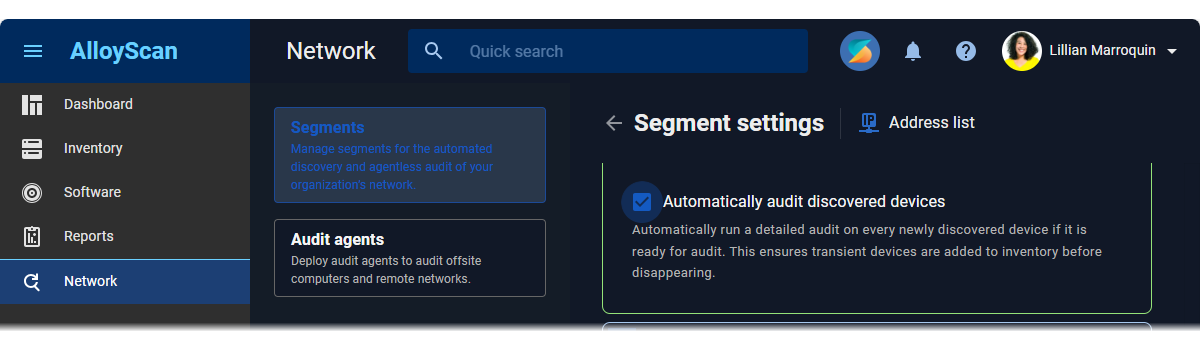
Automated audit of newly discovered nodesAlloyScan can now automatically audit devices as they are discovered when scanning "Domain" or "Address list" segments. This ensures devices are added to the Inventory before they go offline, which is especially helpful for transient or short-lived devices. To enable this, turn on the Automatically audit discovered devices option in a segment's settings. Devices that are ready for audit will then be batched and processed shortly after detection.
Audited nodes count toward your licensed audit limits, unlike nodes that are only discovered. |
|
Printable network diagramsYou can now export network diagrams as PDF or PNG files. This makes it easy to share network layouts with your team, include them in documentation, or overlay diagrams on building plans for clearer planning and communication. |
|
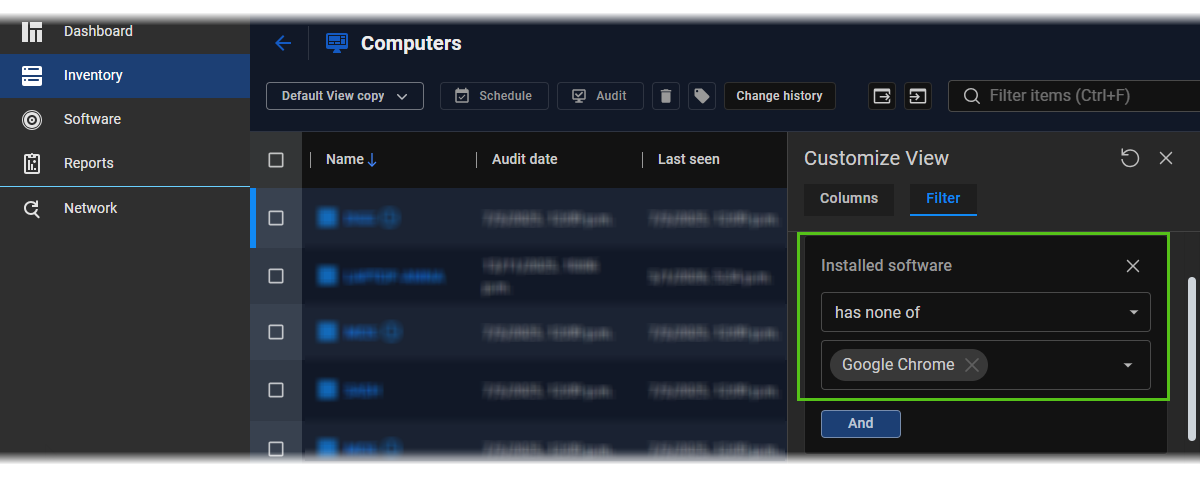
Filtering computers by installed softwareYou can now filter computers by whether specific software is installed or not installed. This lets you quickly display devices that have or don’t have certain applications, making software management easier. To use this feature, click the gear icon in a data view to open the Customize View pane, switch to the Filter tab, and configure one or more Installed software: has all of / has none of / has one of conditions, based on products from your software catalog.
|
|
|
|
|
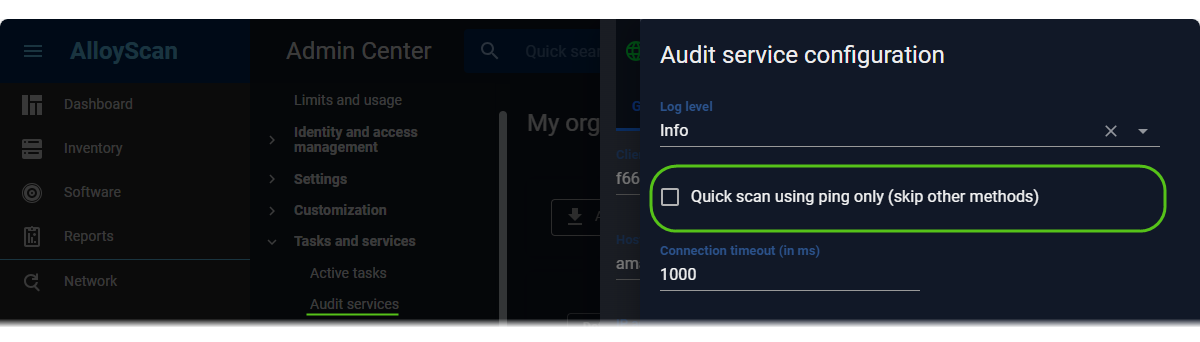
Enhanced deep scan mode for more complete device discoveryThe deep scan mode used by audit services across "Domain" and "Address list" segments has been improved. It now uses additional discovery methods to detect offline and unreachable nodes, providing a more complete and reliable network inventory. To enable deep scan mode, access the Admin Center, go to My organization | Tasks and services | Audit services, double-click the target audit service, click Configuration, and clear the Quick scan using ping only (skip other methods) checkbox (previously Discover only computers and devices that respond to ping requests). Note that such scans will take more time than quick ping-only scans.
Both scan modes start with a ping, so a non-zero Connection timeout (in ms) value is required. |
|
Self-removal of inactive agents and services without server connectionAudit services, audit agents, and their updaters no longer require a server connection to remove themselves after inactivity. This prevents long-disconnected components, such as evaluators after a trial ends, from becoming orphaned and wasting resources, without manual intervention. |
|
UI/UX: Cloud Resource Discovery & Audit improvementsThe Cloud Resource Discovery & Audit feature, introduced in preview in version 24.15, now features a cleaner, more intuitive interface.
|
|
|
|
Resolved an issue where AlloyScan sometimes returned an incomplete list of computers, preventing some devices from being updated in Alloy Navigator. This fix, implemented in version 25.8, has now been officially tested and documented. |
|
Other bug fixes, performance enhancements, and usability improvements. |
|
25.15 |
November 27, 2025 |
|
|
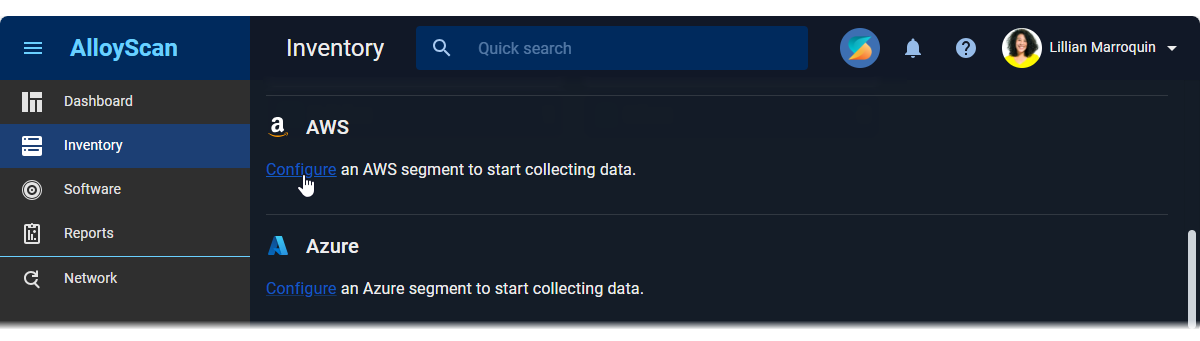
Cloud resource discovery & audit (preview)AlloyScan now supports auditing AWS and Azure cloud resources, allowing you to incorporate your cloud asset data directly into the Inventory for a complete, unified IT infrastructure view. To audit cloud resources, create a segment of the appropriate type, link it to an audit service, and provide the credentials required for accessing your cloud environment. For details, see Help: Creating AWS segments and Help: Creating Azure segments. Cloud data collection follows our standard Scan / Audit model:
This feature is currently in preview. It is fully functional but may continue to evolve. |
Auto-tags for computers audited by agentsYou can now set a default auto-applied tag for computers audited by audit agents. Once set in the Admin Center (My organization | Settings | Audit agents settings), this tag is automatically applied to all computers audited by agents deployed afterward. This eliminates the need to manually tag each computer, which can be cumbersome in large deployments This makes it easy to deploy consistent tags for different sites or device types. For example, tagging all laptops in Site A as "Site A, Laptops, Finance" and all servers in Site B as "Site B, Servers, IT." Like segment auto-tags, the agent auto-tag can still be removed or changed later in the Inventory. |
|
Audit source in audit snapshotsYou no longer need to dig through audit logs to determine how a computer was audited. The new Audit source attribute in audit snapshots shows whether a computer was audited by an audit agent or an audit service, with possible values The attribute is available for data import into Alloy Navigator. |
|
Bulk troubleshooting operationsYou can now perform troubleshooting operations on multiple devices at once using the new Bulk Troubleshoot feature. The button is available within a segment. Select multiple computers or devices, click the troubleshooting icon, and choose one of the available operations:
This saves time when managing large numbers of devices. Instead of enabling PowerShell remoting individually, do it in bulk before rescanning and auditing. |
|
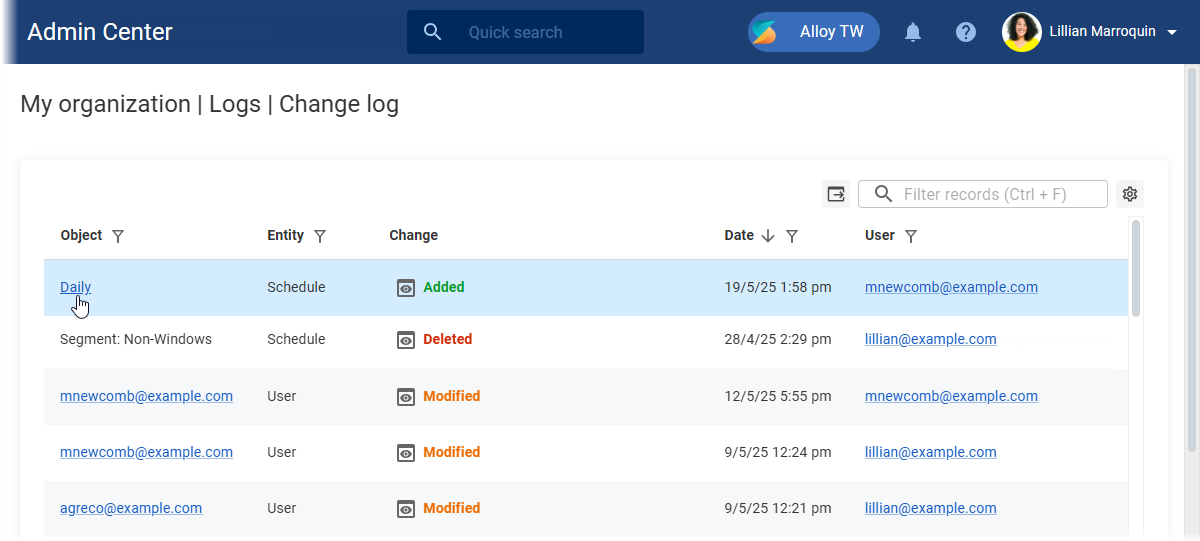
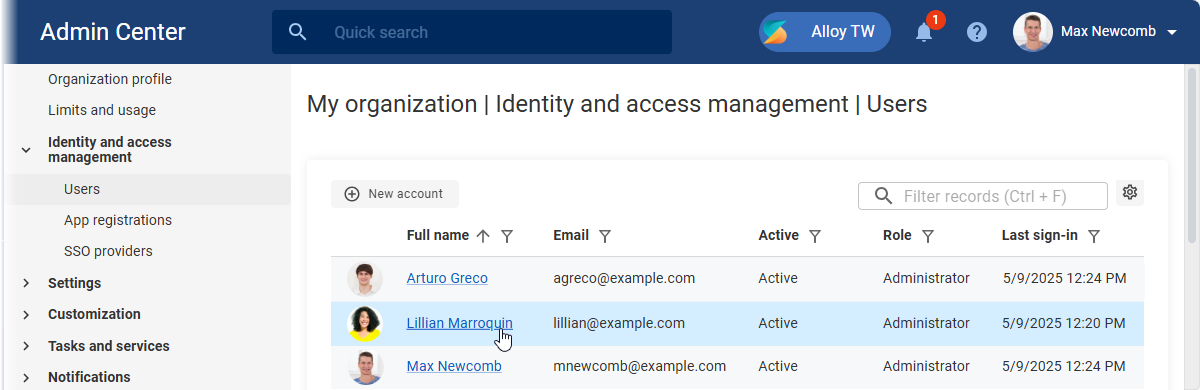
Admin Center UI/UX: Expanded linked record accessAdministrators can now open even more related records directly from the current page, allowing for a smoother workflow. In particular, audit snapshots can be accessed from Active tasks, Audit agents (by clicking the Audit ID), and Audit logs. User forms can now be opened from Notifications and Change log. |
|
|
|
Bug fixes, performance enhancements, and usability improvements. |
25.14 |
October 30, 2025 |
|
|
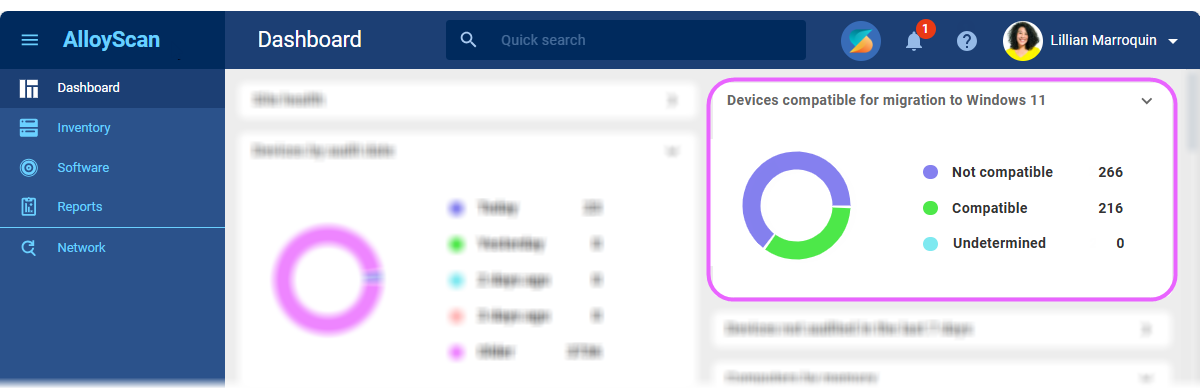
Windows 11 migration readinessWith Windows 10 support having ended in October 2025, AlloyScan calculates a Windows 11 capability indicator for each Windows 10 computer during the audit, and highlights reasons for any incompatibility (TPM, Processor, Secure Boot, etc.). The dashboard now includes a chart widget showing which Windows 10 computers are ready or not for Windows 11 migration. Each chart segment and its corresponding legend entry is clickable, linking to filtered views of devices with details on blocked requirements, making it easy to plan upgrades or replacements efficiently.
The Undetermined chart segment represents devices that have not yet been checked for Windows 11 readiness. These devices need to be audited to determine their compatibility. Requirements checked:
|
CDN-based installer downloads for audit agents and servicesNew audit agents and services now download installer binaries from external CDNs (distributed file delivery networks), primarily Cloudflare R2. This approach improves download speed, reliability, and reduces server load. If the CDN is unavailable, the agents automatically fall back to direct downloads from the servers. Customers with restricted internet access must allow outbound connections to Cloudflare R2 for CDN downloads to work. Existing audit agents and services continue to download binaries from the servers as before. |
|
Reliable updates from shared binaries with signature verificationThe new Alloy Updater for new audit agents and services now downloads a single shared binary for all installations from external storage, primarily Cloudflare R2, using pre-signed URLs to route downloads through the CDN. This improves download speed, reduces server load, and ensures more reliable updates. The updater also verifies the digital signature of each binary, installing only officially signed products to guarantee authenticity and security. |
|
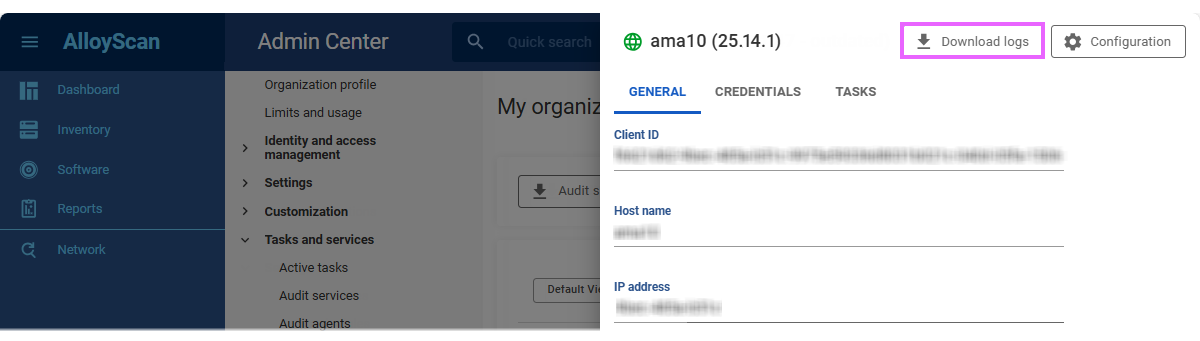
Automatic debug log collectionTroubleshooting problematic services and agents is now easier. When the log level for an agent or service is set to Debug, its logs, along with its updater’s logs, are automatically uploaded to AlloyScan. Each new log archive overwrites the previous one, keeping only the latest logs (by default, the last 24 hours). Administrators can download these debug logs directly from the Admin Center.
If the log level is changed from Debug, the download becomes unavailable until Debug is enabled again, generating a new archive. INFO: For details, see Help: Audit services and Help: Audit agents. |
|
API: workload limits and optimized data accessTo handle potentially large datasets efficiently, the AlloyScan API now enforces workload limits and optimized data access:
These changes improve API performance, prevent unfiltered large data returns, and make data access more predictable and manageable for clients. |
|
|
|
Correct Domain/Workgroup reportingResolved an issue where computers in a workgroup (not joined to a domain) had both Domain and Workgroup fields populated with the workgroup name, causing confusing display in Alloy Navigator and preventing correct data filtering. Now, AlloyScan collects only a single value:
This ensures correct data mapping to Alloy Navigator as soon as AlloyScan is updated to the latest version. |
|
Other bug fixes and usability improvements. |
|
25.13 |
September 15, 2025 |
|
|
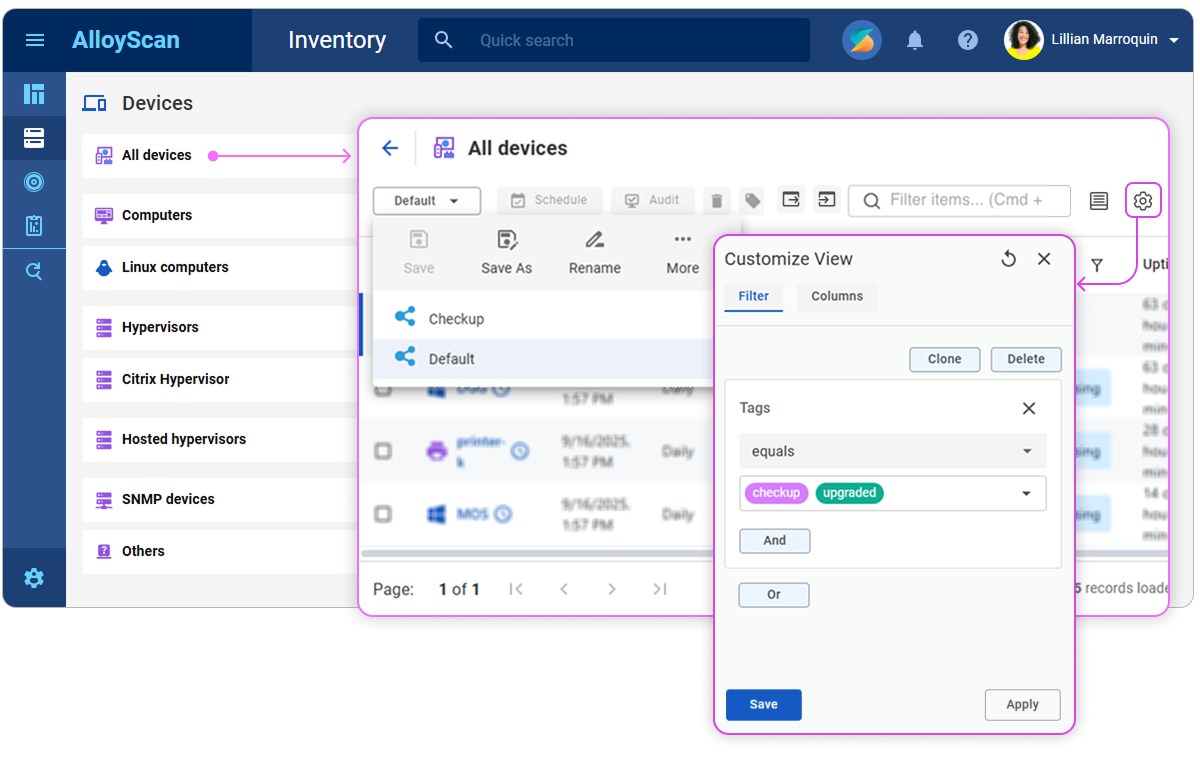
Tile-based Inventory layout and multiple filterable data viewsThe Inventory section now features a tile-based layout, making it easier to navigate your central hub of IT assets. The new layout also creates space for upcoming support of cloud resources — AWS, Azure, and Google. After the upgrade, all first-level groups (All Devices, Not scheduled, Computers, Windows computers, etc.) appear as tiles. Each tile comes with a default data view showing all items within the tile; previously, this represented the entire group. Instead of subgroups, you can now create multiple data views within each tile, applying custom filters with nested logical conditions through the intuitive filter builder. You can easily switch between these views, rename them, temporarily hide those you don't need, and export or import view definitions as JSON. Any custom Inventory subgroups you have created will be automatically converted to new data views during the upgrade. They may take some time to appear after the conversion.
Support for multiple filterable data views has been added to other areas, including the Software section and selected Admin Center pages. In locations where deep filtering is not needed, such as Reports and most Admin Center pages, you can still create multiple views with different column sets and groupings. To create a new view, first save an existing one under a new name, then adjust its filters and columns as needed. |
|
|
Fixed user limit handlingResolved issues where reaching the user limit was incorrectly treated as exceeding it, and limits set to 0 (zero) were incorrectly enforced. Reaching the limit no longer blocks access, and a limit of 0 is now correctly treated as unlimited. |
Corrected Debian Linux detectionFixed an issue where computers running Debian 12 or 13 were being detected as having an "Undefined" operating system. |
|
|
Other bug fixes and usability improvements. |
|
25.12 |
August 25, 2025 |
|
|
Previous audit values kept when new data is missingDuring audits, AlloyScan now retains previous values for any data it cannot gather, instead of overwriting them with empty values. This ensures audit snapshots remain complete and reliable even when some information is temporarily unavailable. |
Windows audit redesigned for reliabilityPreviously, a single failure in the Windows audit process could lead to large amounts of data not being collected. Now, the audit runs in multiple smaller steps; if one fails, only that part is affected, while the rest continues. This ensures audit data stays complete and reliable, even when some commands fail. |
|
Select all records across all pagesYou can now select all records across all pages in a multi-page grid, instead of only the current page. The main checkbox first selects the current page (shown as partially checked) and then lets you select all N records across all pages. This works everywhere, including main data grids, sub-grids on forms, and select forms.
|
|
Dashboard refreshed with useful updatesThe dashboard has been cleaned up and improved to focus on meaningful data:
|
|
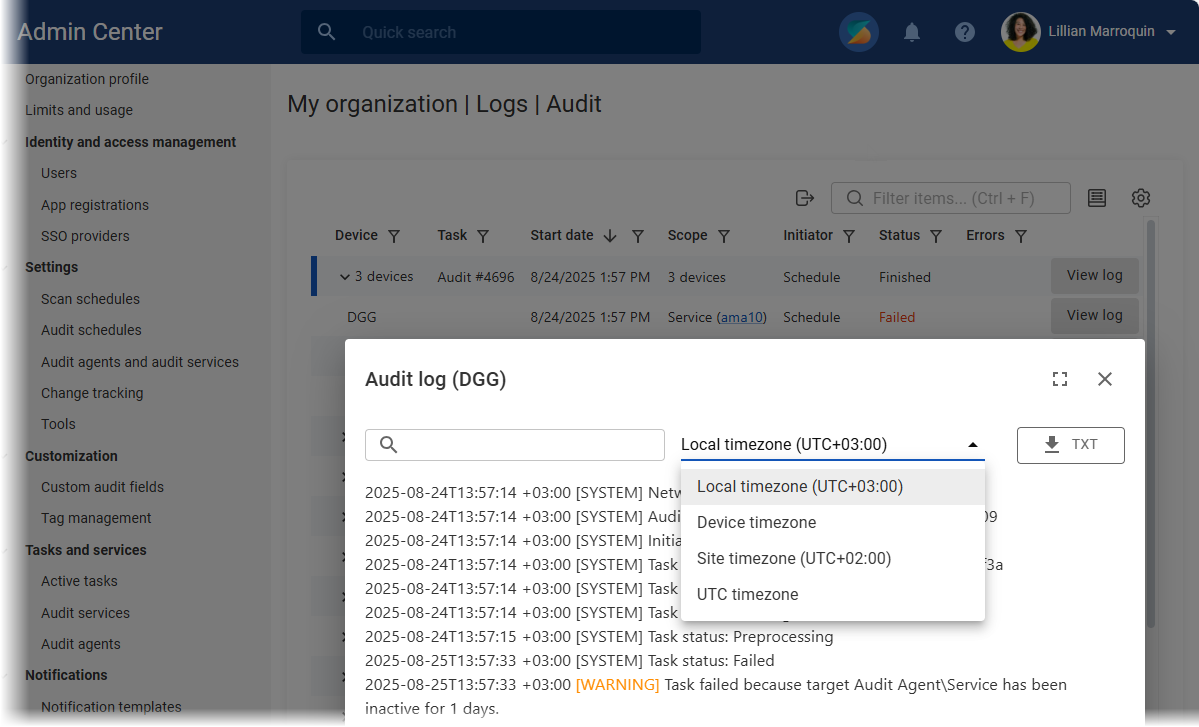
Admins can manage logs more efficientlyThe Admin Center makes it easier for administrators to review and manage scan and audit logs.
|
|
|
|
Minor bug fixes and usability improvements. |
25.11 |
August 11, 2025 |
|
|
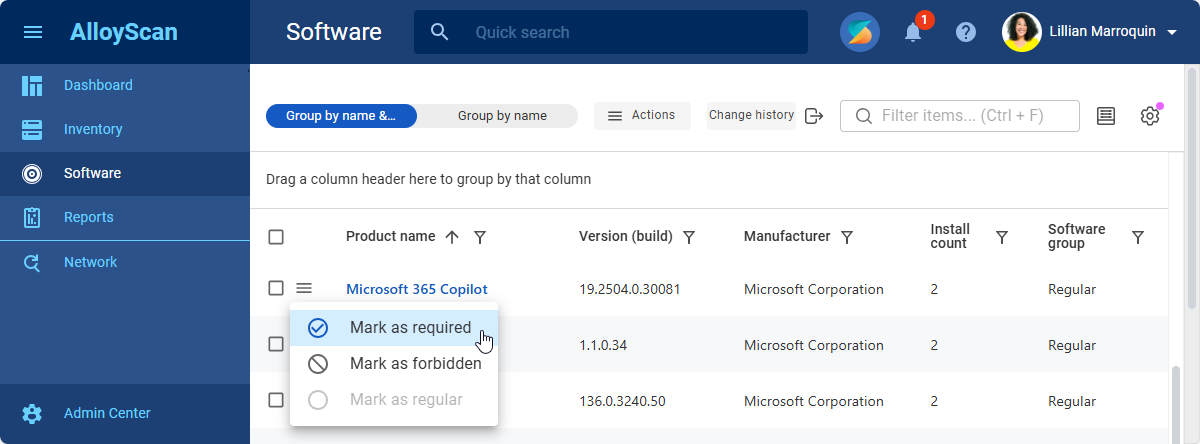
Software groups: Regular, Required, and ForbiddenNow you can classify detected software into three clear groups to improve tracking and decision-making:
These group assignments control whether AlloyScan tracks software changes. By default, no software changes are tracked, and all detected software is classified as regular. To begin tracking, mark software as required or forbidden, then enable change tracking for those groups only. This helps you avoid cluttering your history with routine updates to unimportant software (for example, those in the regular group). This release lays the groundwork for smarter compliance policies, targeted alerts, and full-scale Software Asset Management once AlloyScan software group assignments flow into Alloy Navigator in Fall 2025.
INFO: For details, see Help: Software grouping. |
Automated removal of inactive devicesAlloyScan can now automatically remove devices that have not been audited for more than [X] days (365 by default), such as those decommissioned or broken. This helps keep your inventory accurate by clearing out old, inactive records. The new setting is available in Admin Center, under Settings > Audit agents and audit services > Pruning.
INFO: For details, see Help: Pruning. |
|
|
|
Fixed bugs and improved usability. |
25.10 |
July 28, 2025 |
|
|
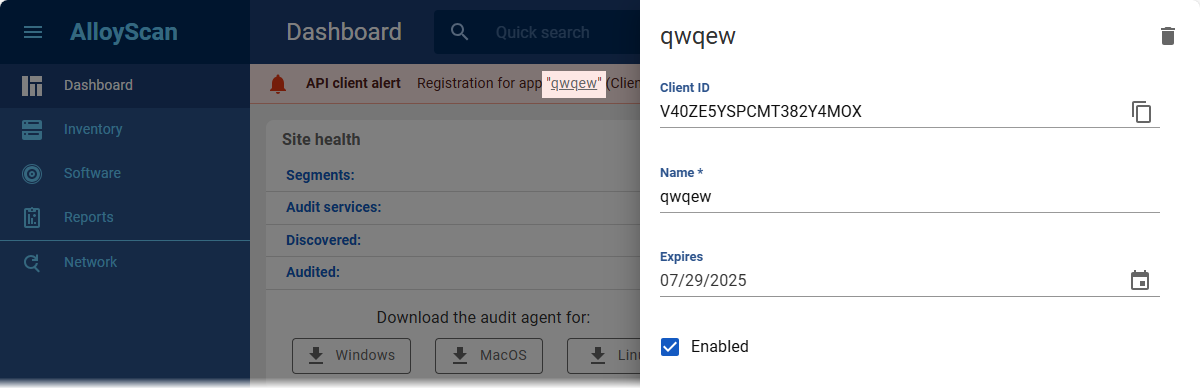
Open linked records without losing your contextIntroduced the ability to open related records directly on the current page, preserving your workflow and context. For example, you can now access the linked app registration from the expiration banner or the device details from the audit agent record. Additional scenarios will be supported soon.
|
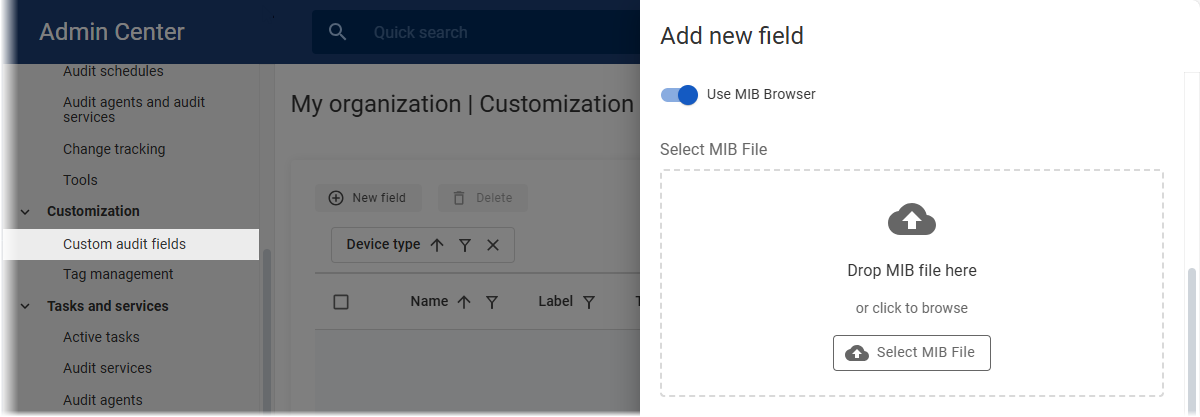
Custom fields for SNMP devices: MIB-based value selectionExtracting precise device data via SNMP just got simpler and more accurate. You can now load a vendor-provided MIB file and select a specific branch to automatically fill in the OID and label when creating a custom field. This reduces setup time and ensures that the field pulls exactly the data you need from the device.
|
|
Improved visibility into audit agentsCentralized tracking of installed agents in the Admin Center (My organization > Tasks and services > Audit agents) is now more efficient with the following enhancements:
|
|
Straightforward tracking of grouped audit tasksPreviously, grouped audit tasks stayed listed under active tasks in the Admin Center (My organization | Tasks and services | Active tasks) until every individual task was completed. Now, monitoring is more straightforward: active tasks remain in the active list, while completed ones move to the audit log (My organization | Logs | Audit), with both still accessible within their group. |
|
|
|
Fixed bugs and improved usability. |
25.9 |
July 14, 2025 |
|
|
SNMPv3 initialization fix: SHA-2 support addedAddressed the issue where SNMP scans were failing with the error "Connection test failed. Reason: Failed initializing SNMP (Request timed out after 2000-ms.)." The fix involves adding support for SHA-2 (including SHA-512) in SNMPv3 authentication. |
| Other bug fixes and usability improvements. | |
25.8 |
June 26, 2025 |
|
|
Introduced change history reportsTwo new default reports — Device Change History and Software Change History — provide clear insight into changes, helping you easily track configuration updates over time. |
Improved device identification algorithmWe've improved the algorithm for assigning unique device identifiers (AuditId) to prevent duplicates and ensure consistent identification of all audited devices. Existing records are automatically updated during the upgrade. |
|
Queued audit processing for improved performanceAudit snapshots submitted by agents and services are now added to a processing queue instead of being handled immediately. This change improves performance and stability, especially in high-volume environments, ensuring smoother processing even during peak loads. |
|
Credentials persist after audit service reinstallationCredentials linked to audit services are now preserved during service reinstallation. This helps ensure uninterrupted auditing when reinstallation is necessary. |
|
|
|
Improved the error message when saving audit credentials while the audit service was unavailable. Instead of the vague "Bad Request. Target Audit Service Not Active," it now explains the issue and offers guidance to resolve it. |
|
In some environments, newly installed agents failed to send audit data due to server errors (e.g., 502 Bad Gateway). When this happened, the audit data was lost, no record appeared in the Inventory, and the only recovery option was to reinstall the agent, which was a significant challenge at scale. Now, if the agent doesn't receive server confirmation after submitting audit data, it automatically retries every 8 hours. This helps prevent data loss and eliminates the need to reinstall agents. |
|
| Other bug fixes and usability improvements. | |
25.7 |
June 6, 2025 |
|
|
Audit trail for configuration settingsThe Change log has been implemented to track modifications to AlloyScan settings by recording who made the changes, what was changed, and when, with the ability to drill down into the changed entities. It logs actions such as adding or editing segments or inventory groups, creating or modifying users or API registrations, and updating audit schedules.
INFO: For details, see Help: Change log. |
Troubleshooter improvementsWhen the troubleshooter checks a remote computer and fails to connect via WMI, it now additionally verifies the availability of the RPC server port. If the RPC port is unavailable, the error message explicitly states this. Otherwise, only the system WMI connection error is shown. |
|
Displaying multi-type custom fields as one columnAdded the ability to display custom audit fields representing the same data across computers and SNMP devices (such as Uptime) as a single unified column in the Inventory data grid. Previously, separate fields for computers and SNMP devices had to be added individually to combined data views. Now, by creating custom fields with the same label for both device types, you can add just one field to combined views to show data for both. For instructions on adding custom fields, see Help: Custom audit fields. |
|
No more duplicate license expiration emails for site adminsTo avoid duplicate notifications, AlloyScan no longer sends license expiration emails to site administrators. Push notifications and in-app banners remain active. Global administrators still receive email notifications about instance-level license expiration. |
|
PATCH support added to AlloyScan API for incremental updatesPATCH methods have been implemented for 29 existing PUT methods in the API. Unlike PUT, which replaces entire entities, PATCH allows partial, incremental updates by modifying only the properties included in the request. All PATCH method properties are optional. This improvement provides more flexible and efficient updates, reduces the risk of accidental data loss, and improves performance. |
|
|
|
Updated field names in API responsesWe fixed inconsistencies in several API responses:
If you use custom integrations, please review your setup to ensure compatibility. If you use custom integrations, please review your setup to ensure compatibility. |
Fixes and improvements for sync with Alloy Navigator
|
|
Improved device display on Network gridThe Network data grid now shows device manufacturers from audit data when available. Previously, it always displayed the manufacturer from discovery data, which sometimes caused incorrect information for audited nodes (e.g., computers behind Cisco IP phones shown as "Cisco"). |
|
| Other bug fixes and usability improvements. | |
25.6 |
May 8, 2025 |
|
|
Refreshed Admin CenterThe Admin Center has been updated with a consistent, structured design. Standardized layouts, pages, and UI elements now deliver a smoother, more cohesive user experience.
|
Optimization and scalability improvements
|
|
|
|
Fixed bugs, enhanced stability, and improved usability. |
25.5 |
April 14, 2025 |
|
|
Improved scalability for large deploymentsImproved performance and reliability of mass updates in large-scale deployments. |
Optimized agent behaviorUnified audit agent installers, smarter request handling, and improved caching for better performance and stability. |
|
|
|
Minor bug fixes and usability improvements. |
25.4 |
March 21, 2025 |
|
|
Regional formats from user’s browserAlloyScan now automatically applies regional formats for dates, times, and numbers based on the user’s browser locale. |
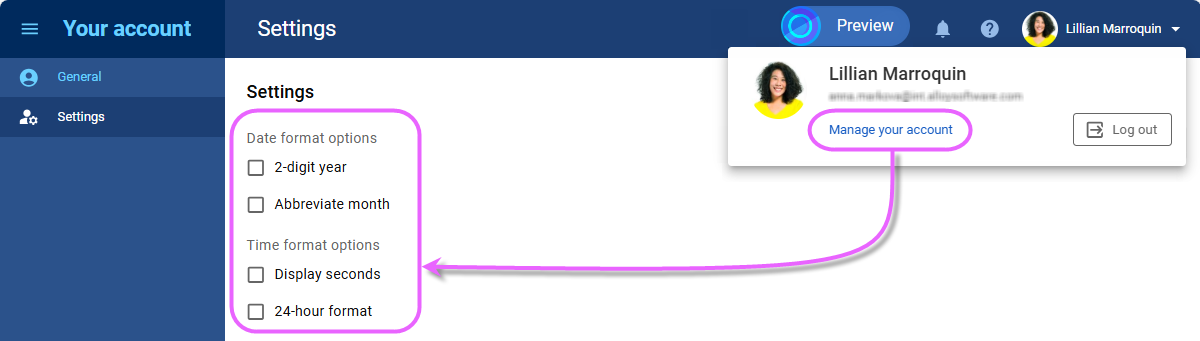
Compact date and time formatUsers can now display dates and times in a more compact format, making room for more columns in data views—especially useful on smaller screens. The format can be customized with options like two-digit years, abbreviated months, omitting seconds, and the 24-hour format, all adjustable in personal account settings.
|
|
Optimized field widthsInput fields for integer, date, and date/time values now align with their actual data limits for a cleaner UI. Standard integers fit within appropriate widths, while larger values get extra space as needed. |
|
Auto-generated site avatarsSites without a custom avatar now get a unique, auto-generated one. These avatars use the site's title initials and come in different colors, making it easy to distinguish between sites at a glance.
We’ve also enhanced the UI for uploading site avatars to provide a better user experience. |
|
|
|
Resolved issues with displaying custom fields on the device audit data form in Alloy Navigator when synced with AlloyScan. Also fixed the View in AlloyScan button, which was unresponsive in some cases. |
|
Resolved an issue where duplicate templates for conditional notifications could appear in the Admin Center under specific conditions. |
|
| Audit agents now log their first audit task, which runs immediately after installation on target computers. Supported on Windows, Linux, and macOS. | |
|
Improved detection of licensing information for Windows and Microsoft software products, including SQL Server, Office, Project, Visio, and selected Microsoft applications. The collected data helps monitor software licensing compliance for these products in Alloy Navigator when synced with AlloyScan. |
|
| Other bug fixes, usability enhancements, and security improvements. | |
25.3 |
March 6, 2025 |
|
|
Resolved an issue where users received an invalid password reset link on instances with a three-level domain. |
|
Resolved issues with auditing switches, printers, and other SNMP devices via SNMPv3, despite correct SNMP credentials. |
|
|
Other minor bug fixes and usability improvements. |
|
25.2 |
February 20, 2025 |
|
|
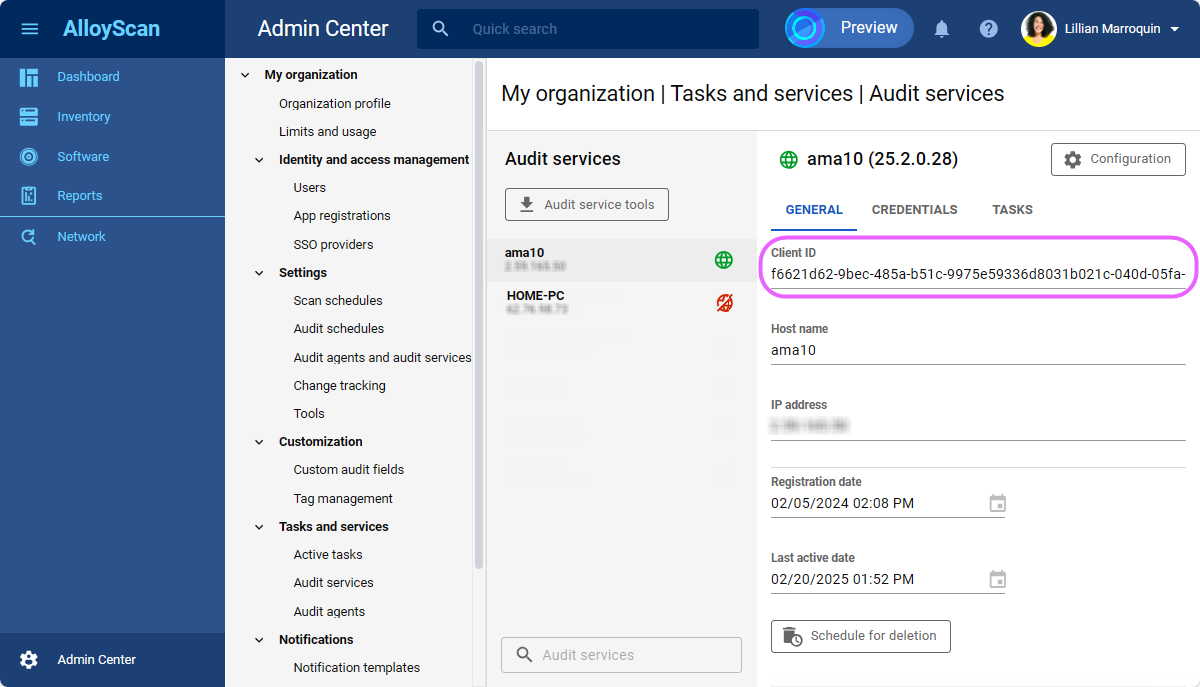
Unique identifiers for audit agents and servicesInstead of relying on host names, audit agents and audit services now use a unique identifier for registration in AlloyScan, eliminating potential conflicts. Previously, host name-based registration could cause issues when multiple computers shared the same name within a network. With this new approach, registration is seamless and collision-free.
|
|
|
Resolved an issue where existing hypervisor credentials were not applied to new segments. |
|
Other minor bug fixes and usability improvements. |
|
25.1 |
January 29, 2025 |
|
|
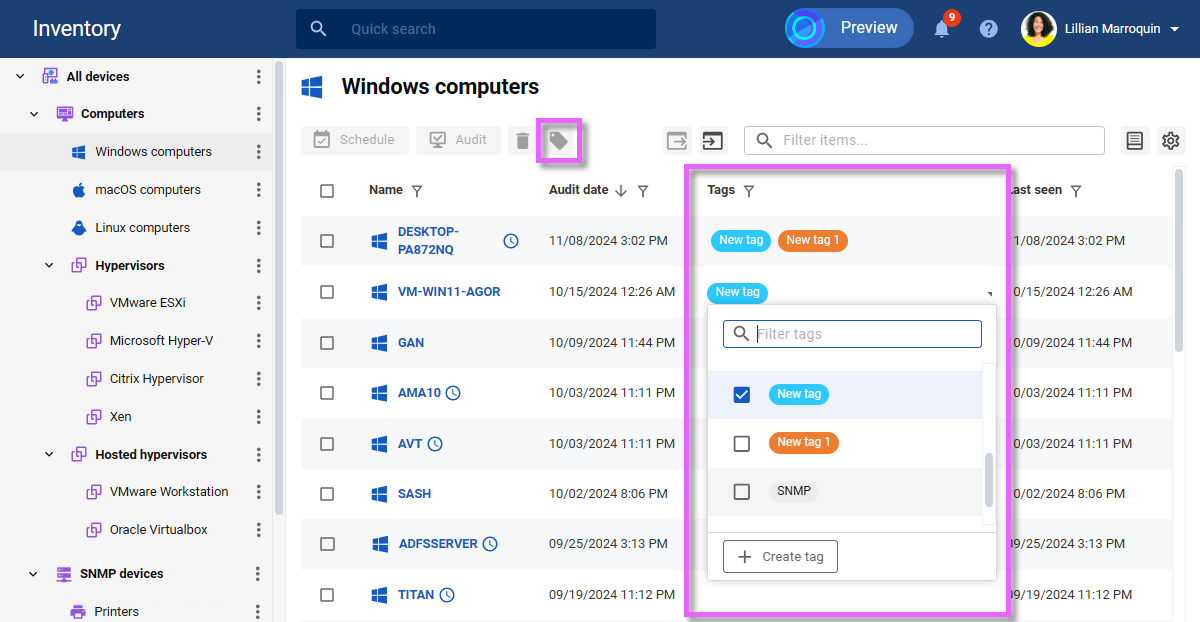
Introducing tags for better inventory organizationWe’ve added tags—colorful labels that help you organize and classify your inventory more effectively. Tags let you apply flexible, multi-category classifications to inventoried devices, adding more context and making it much easier to locate information. You can tag records directly from the Inventory section, either individually using the Tags column or in bulk using the Tags Administrators can manage all tags and track their usage in the Admin Center, under My organization | Customization | Tag management.
INFO: For details, see Help: Tagging records. |
Streamlined audit schedule managementWe’ve enhanced the UI/UX for managing audit schedules, making it more intuitive, simpler, and consistent. |
|
Improved notification subscription managementManaging notification subscriptions is now easier and more transparent. Administrators can view each user’s subscriptions and see who is subscribed to specific notifications. The new Notifications | Subscriptions section in the Admin Center provides a clear overview of users and their subscriptions, allowing for monitoring who receives critical updates. Additionally, each user record now includes their subscriptions, while each notification template shows a list of users subscribed to it. These improvements simplify subscription management, reduce errors, and ensure the right people stay informed. INFO: For details, see Help: Subscriptions. |
|
Notification logNotification logging is now available in the Admin Center, under Logs | Notifications. Administrators can easily view which notifications were sent, to whom, when, and their status. Notifications are logged at both the site and instance levels. |
|
|
|
Minor bug fixes and usability improvements. |
 NEW
NEW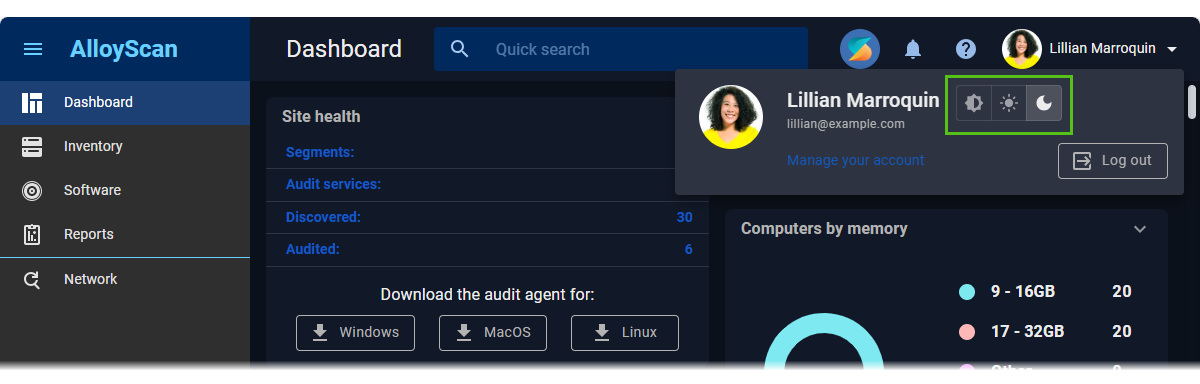
 FIXED
FIXED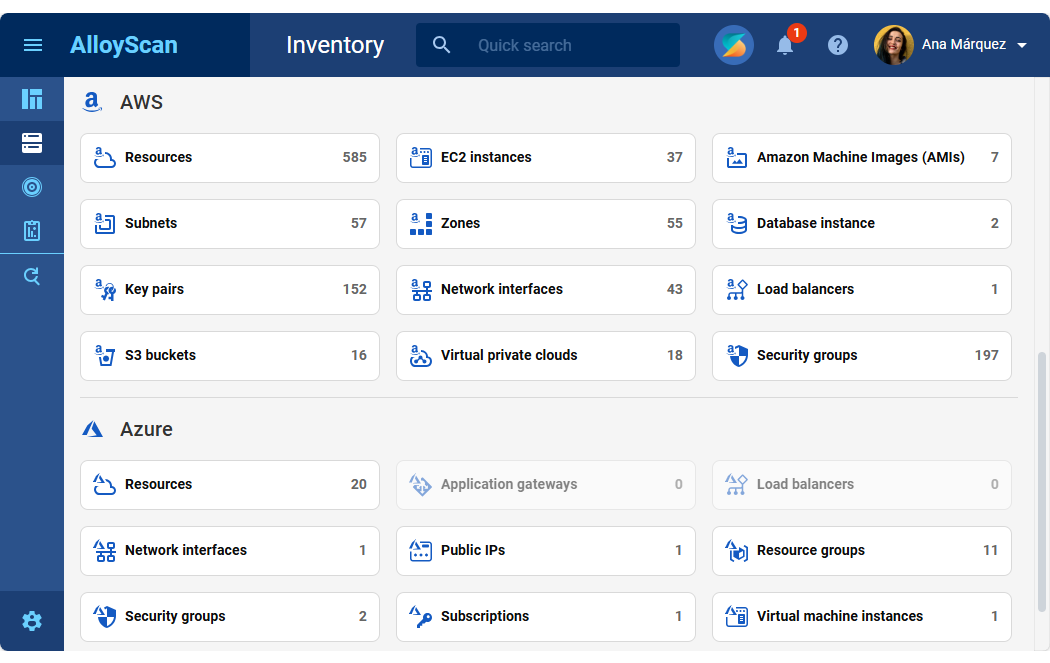



 button.