Alloy Navigator Mobile Release Notes
Updated: August 27, 2026
The release notes below describe updates to the
This version of the release notes applies to the
2.4.94 (August 27, 2026)
New features
-
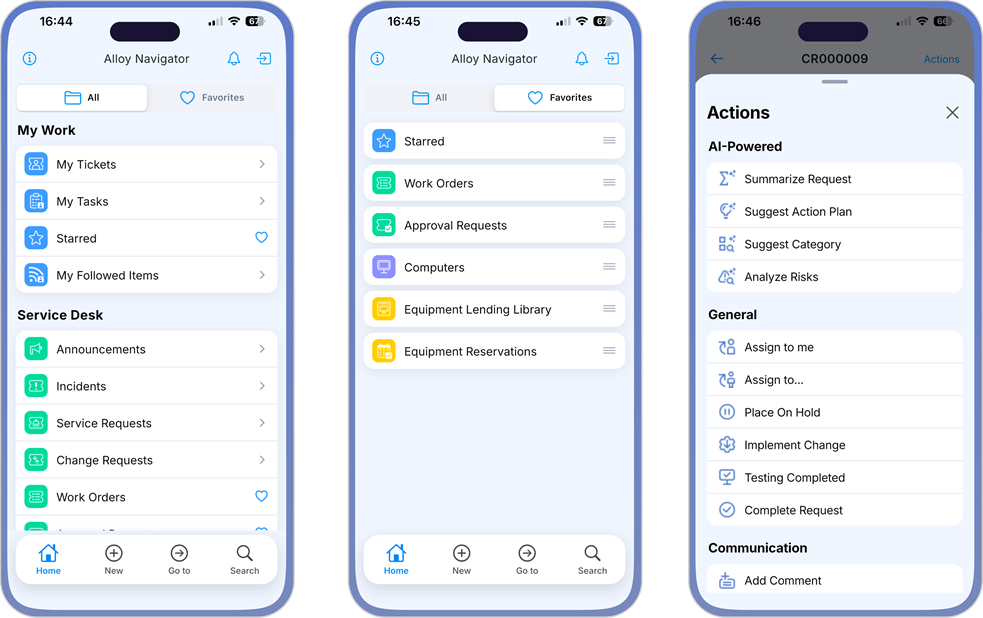
Updated the mobile app with platform-specific interfaces for iOS and Android, replacing the previous shared design.
The new interfaces follow native Apple and Google design conventions, providing a more familiar and intuitive experience on each platform. This includes native navigation behavior, such as back-swipe on iOS and proper support for the system back button and gesture on Android.
Enhancements and resolved issues
-
Resolved an issue where the vertical scrollbar could continue scrolling past the end of a Knowledge Base article. Scrolling now stops when the end of the article is reached.
-
Minor bug fixes and internal improvements.
2.4.91 (June 24, 2026)
New features
-
Expanded support for additional IT asset management object classes. The mobile app now provides access to ITAM items such as computers, hardware, contracts, and consumables
-
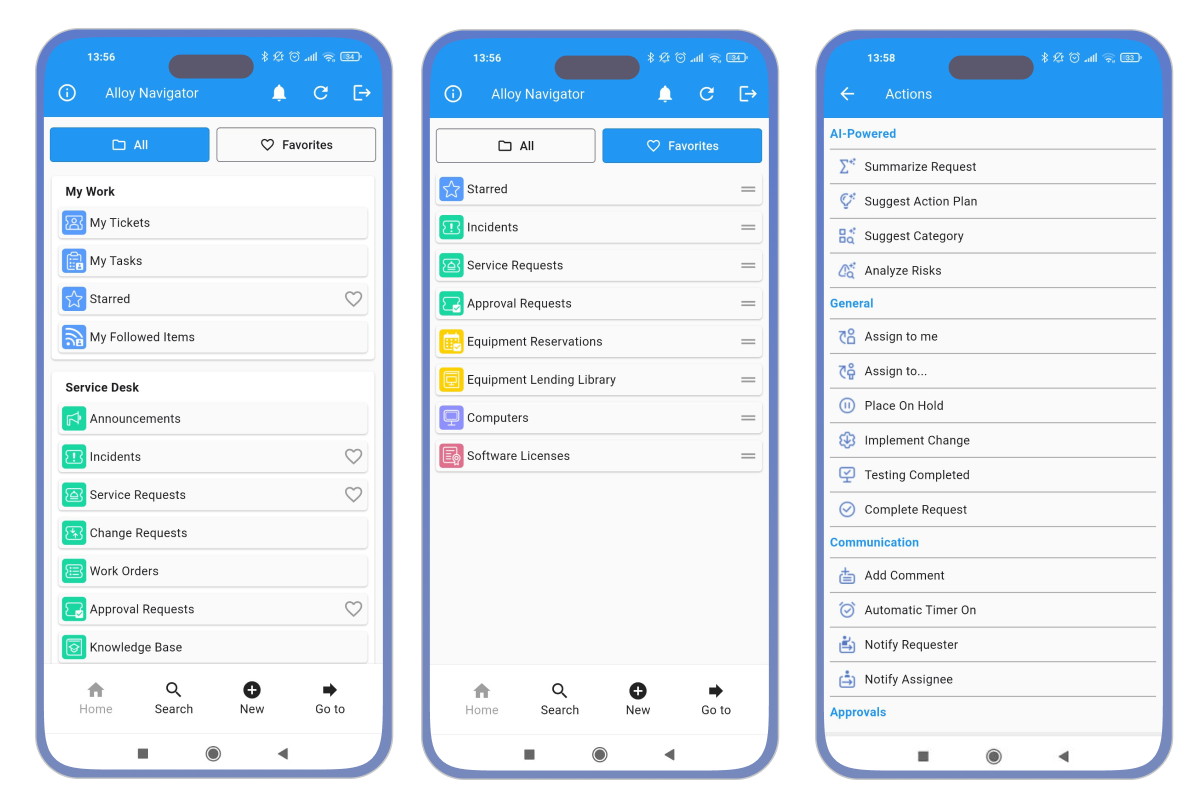
Added Favorites mode to the home screen. You can now keep frequently used areas at your fingertips and access them faster from the new Favorites view, or switch to All to see all available areas.
-
Added the new My Work section for quick access to your personal items, including My Tickets, My Tasks, Starred, and My Followed.
-
Added support for AI-powered workflow actions. Depending on your organization’s configuration, AI-powered actions may appear in the Actions menu together with other workflow actions available for the current item. These actions can help summarize information, suggest solutions or categories, analyze risks, and perform other AI-assisted tasks.
Availability of AI-powered actions in the mobile app depends on your Alloy Navigator workflow configuration and may require workflow updates by your administrator. Out-of-the-box AI-powered actions for Service Desk tickets require updates to their Additional criteria settings before they can be used in the mobile app.
The new features require Alloy Navigator server 2026 or later. Administrators can control which objects classes and areas are available in the mobile app. For details, see Alloy Navigator mobile app configuration.
Enhancements and resolved issues
-
Updated the Alloy Software logo for a more consistent experience across the Alloy Software platform.
-
Resolved an issue where tapping Back on the first page of a create-action form could create a ticket unexpectedly. The form is now closed correctly without creating a record unless the action is completed.
-
Resolved an issue where the mobile app did not start in some cases on iOS devices. The app now launches correctly in the affected scenarios.
-
Minor bug fixes and internal improvements.
2.4.86 (December 31, 2025)
-
Minor bug fixes and internal improvements.
2.4.85 (December 5, 2025)
-
Minor bug fixes and internal updates.
2.4.81 (June 11, 2025)
-
Dropdown lists now show user avatars and email addresses alongside full names when
-
Read-only text fields now allow selection with standard actions such as Copy or Share in ticket descriptions, knowledge base articles, and other content, with a long tap to select a word.
-
Currency values now display more clearly throughout the app.
-
Discontinued support for the legacy Mobile Portal (Mobile App Service). The Alloy Navigator mobile app has been using native API integration since August 2020, so the Mobile App Service is no longer required.
- Internal improvements and minor bug fixes.
2.3.78 (December 14, 2024)
-
Minor bug fixes and internal updates.
2.3.77 (May 31, 2024)
-
Introducing support for equipment lending library. You can now manage equipment checkouts and reservations from the mobile app. Barcode and QR code scanning makes it easy to quickly locate library items and assets in the app.
This functionality also allows you to manage IT assets.
This feature requires Alloy Navigator server 2024 or later.
-
The mobile app now correctly follows the date and time format configured on your device.
-
User experience in wizard-style action forms has been improved.
-
Implemented proper display of Knowledge Base articles.
-
Discontinued support for HTTP connections; secure HTTPS is now required.
Contact your Alloy Navigator administrator for a new URL to sign in, if needed.
-
Other improvements and minor bug fixes.
2.3.73 (January 26, 2024)
-
Added support for a more secure Google OAuth authentication flow.
-
Minor fixes and internal updates.
2.3.70 (December 9, 2023)
-
Introduced seamless onboarding with no manual input required. New users can quickly access the system by scanning a QR code, which automatically fills in the URL and, if needed, their username.
Contact your Alloy Navigator administrator to get the QR code.
2.2.66 (November 15, 2023)
-
Minor fixes and internal updates.
2.2.64 (July 14, 2023)
-
Introducing support for the Knowledge Base. Now you can access a wealth of valuable information, including how-to articles, FAQs, troubleshooting instructions, and more, no matter where you are.
This feature requires Alloy Navigator server 2023 or later.
-
Added a flash mode option for taking pictures.
-
Fixed an error that occurred when moving to the next page in a wizard without filling optional fields.
-
Minor fixes and internal improvements.
2.2.60 (April 28 , 2023)
-
Redesigned the login page with a simpler, smoother sign-in experience.
-
Added an eye icon to show the password as you type.
-
Added the ability to switch between multiple accounts and different servers, with your credentials remembered.
-
Minor improvements and bug fixes.
2.2.56 (January 25, 2023)
-
Added support for attachments. You can now attach photos, files, or other documents when
-
Minor improvements and bug fixes.
Earlier versions
Changes for earlier versions are available upon request.