What's new in AlloyScan 26
Updated: October 15, 2026
Check out the summary of changes we made to AlloyScan in 2026.
26.10 |
October 13, 2026 |
|
|
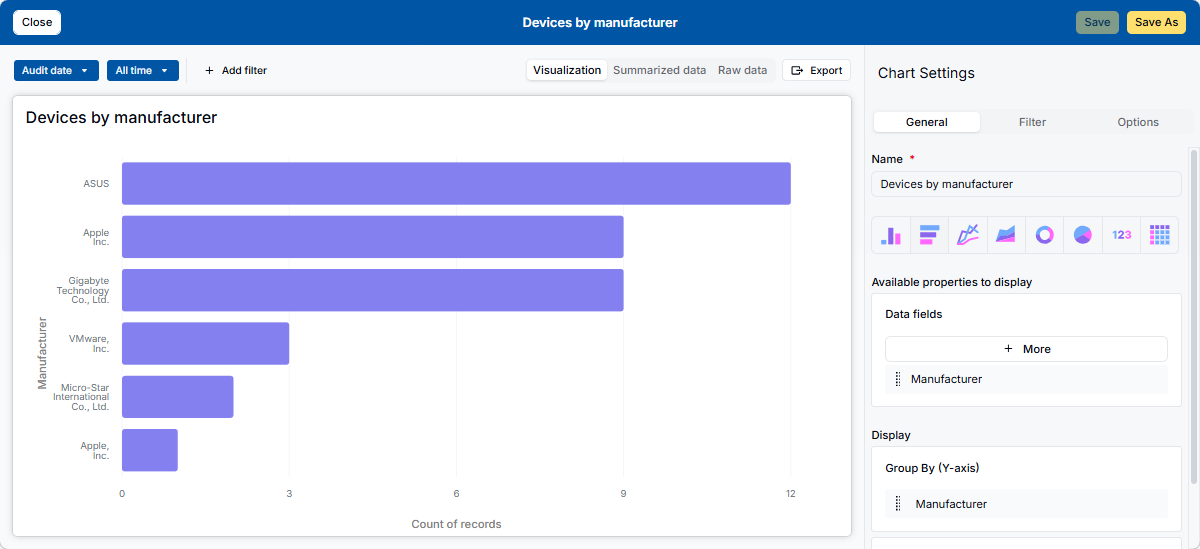
Analytics sorting and display improvementsYou can now sort grouped Analytics results by record count to see the largest groups first, or by group value to make specific groups easier to find. Each grouping level has its own sorting settings. Separate display limits let you highlight the most relevant results on the dashboard while keeping the full breakdown in Analytics. For example, a dashboard widget can show the top five device manufacturers by device count, while Analytics retains the complete list.
By default, Analytics shows all groups. You can configure dashboard widgets to show 1–10 groups at each grouping level, or 1–10 rows for a Raw Data table. The default widget limit is 10. |
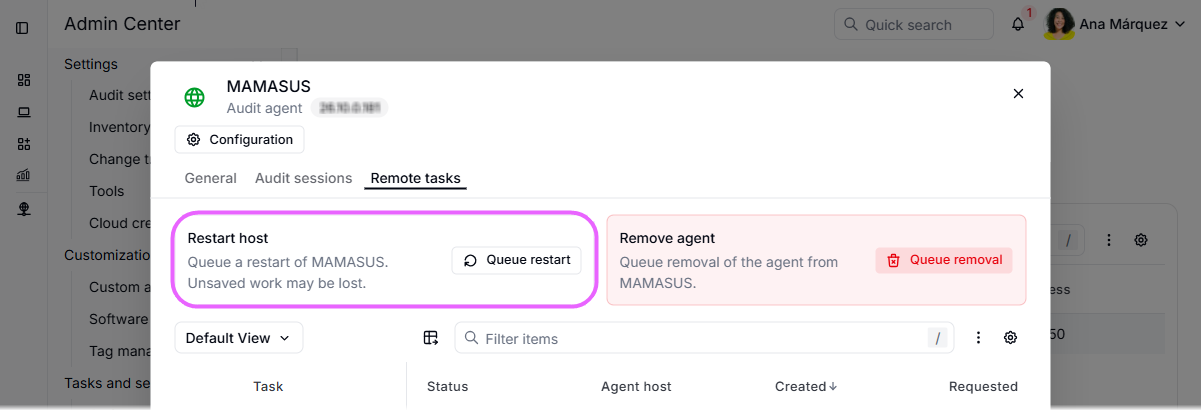
Remote host restart via Audit AgentsAdministrators can now restart remote Windows, Linux, and macOS computers through their Audit Agents. Because the agent retrieves the restart request from AlloyScan, direct network access to the computer is not required, provided the agent can communicate with AlloyScan. To request a restart, go to Admin Center > Tasks and services > Audit agents, open the computer’s Audit Agent details, and click Queue restart on the new Remote tasks tab. The restart task and its progress are logged in the agent task history, so you can check the results. We've also made the agent details form easier to use, with a clearer layout and more intuitive action labels.
Remote restart requires an updated Audit Agent; agents update automatically. |
|
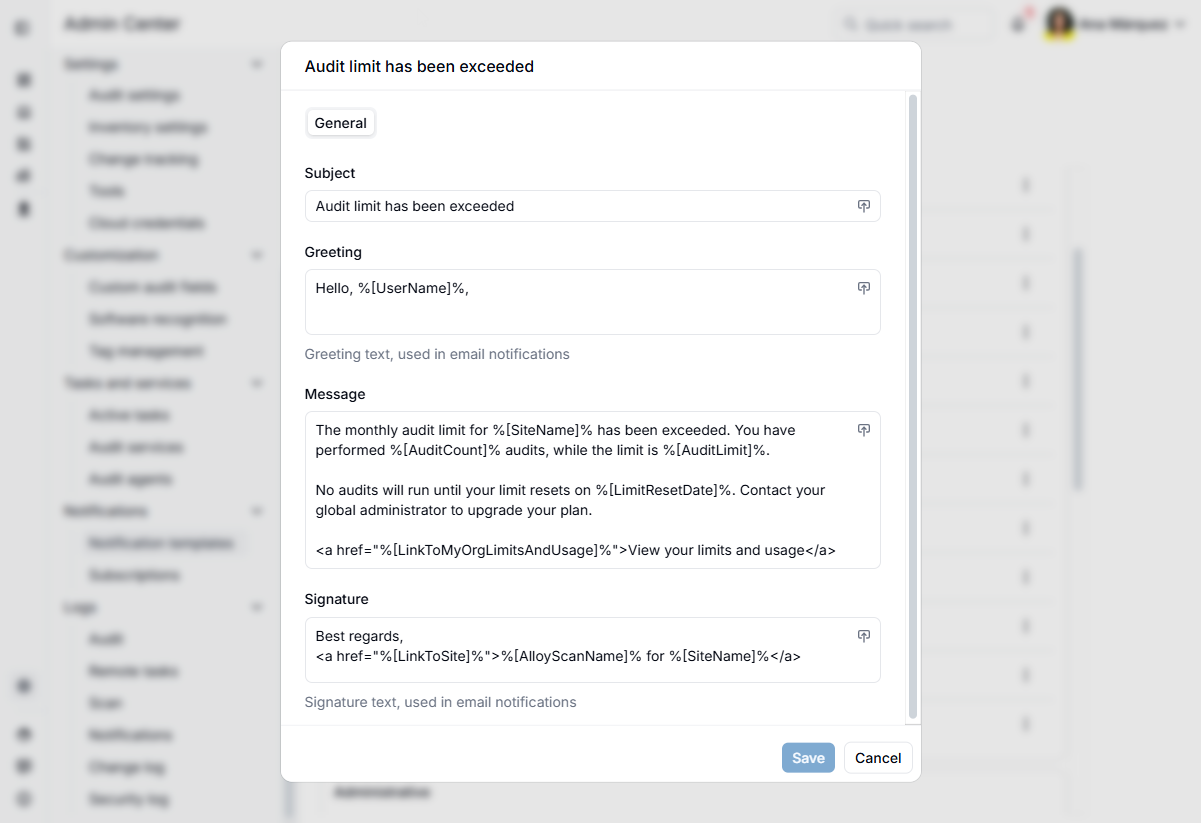
Customizable system notification templatesAdministrators can now customize the email notifications associated with system banners about license expiration and usage limits. Change the greeting and signature, adjust the wording, and add relevant contact details or instructions to make these alerts more useful for your organization. As a site administrator, you can edit these templates under Admin Center > Notifications > Notification templates > System. The banner text remains fixed, and you continue to receive these notifications automatically without subscribing. These notifications are now recorded in the notification log, making them easier to track and troubleshoot.
Global administrators can customize system notification templates for sites, copy them to existing sites, and customize their own system notification templates. |
|
|
|
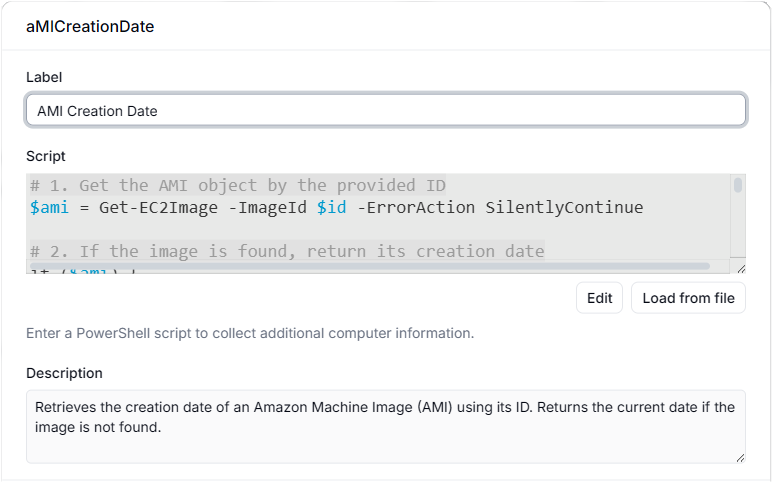
Administrators can now resize the dialogs for writing PowerShell scripts for custom audit fields and software recognition rules. The larger workspace and improved scrolling make long scripts easier to view and edit. |
| Other usability and reliability improvements. | |
| Minor bug fixes. | |
26.9 |
September 15, 2026 |
|
|
Audit cloud resources without a local audit serviceYou can now scan and audit cloud resources using AlloyScan cloud workers, hosted and managed by AlloyScan. This removes the need to install and maintain a local audit service for cloud inventory collection. Cloud workers support AWS, Azure, Google Cloud, Google Directory, and Jamf. To switch an existing cloud segment, select AlloyScan cloud worker in its settings. This option is selected by default for new cloud segments. Cloud workers need credentials stored in AlloyScan. Since your existing Audit Service credentials remain in your local network, you'll need to add cloud credentials when configuring the segment. AlloyScan encrypts them before storage and decrypts them only when needed for scans and audits.
This change is optional. You can continue scanning and auditing cloud resources using your local audit service without changing any segment settings or credentials. |
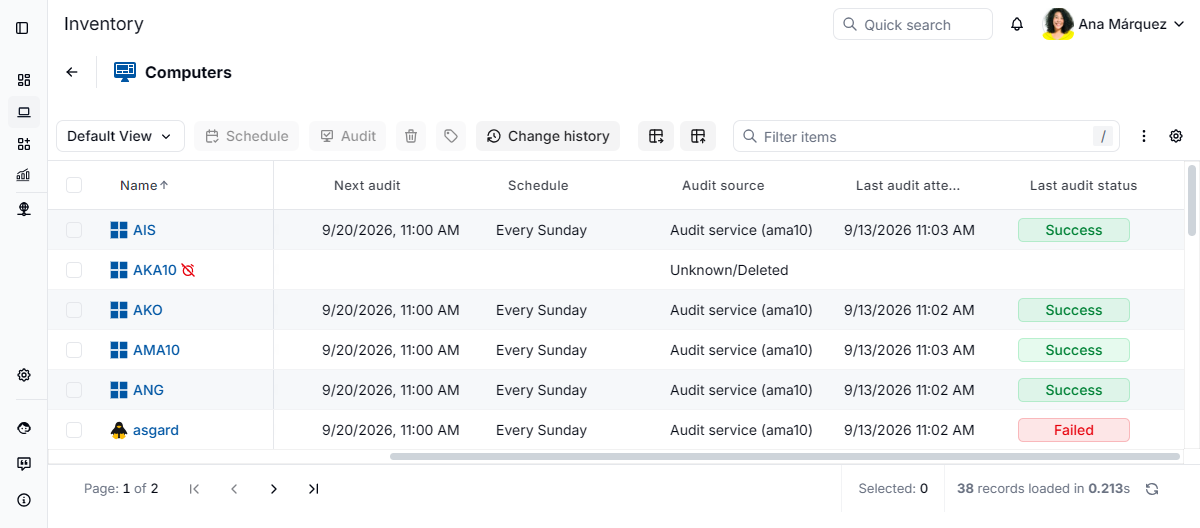
Keep row details in view while scrollingThe first visible column now stays frozen as you scroll horizontally through a data view. You can review fields on the right while keeping the device name or other identifying information in view. Links in the frozen column remain accessible, so you can open related records without scrolling back.
If you hide the system column containing the device name or other identifying information, the next visible column stays frozen instead. |
|
Clearer status during AlloyScan updatesWhen we're updating AlloyScan, a new Update in progress page lets you know what's happening. You can leave it open: the page refreshes automatically and returns you to AlloyScan when the update is complete. API responses also indicate when an upgrade is in progress, helping integrations distinguish temporary maintenance from an unexpected problem. |
|
Reduced traffic and automatic cleanup for disconnected agentsAudit agents and their updaters now reduce unnecessary network traffic during prolonged communication failures. After three days without successful communication, they reduce connection attempts to about once an hour. After 90 days without successful communication, the agent automatically uninstalls itself and its updater, removing long-disconnected installations without manual cleanup. |
|
Improved agent connection reliabilityWe've simplified audit agent authentication behind the scenes by switching to built-in security keys. This reduces authentication-related connection failures, helping agents continue auditing with less need for manual troubleshooting. |
|
Updated startup and upgrade handling for audit agentsWe've simplified startup checks in audit agents and updaters, including how they handle computer names. Name changes are now processed when AlloyScan receives an audit, updating Inventory and related agent records together. Automatic migration from audit agent and updater versions 25.x and earlier is no longer supported. These installations require manual reinstallation to bring them up to date. |
|
|
|
Fixed an issue that prevented changes under Admin Center > Settings > Change tracking from being saved. Change tracking now remains enabled after saving. |
| Other performance and reliability improvements. | |
| Minor bug fixes. | |
26.8 |
August 26, 2026 |
|
|
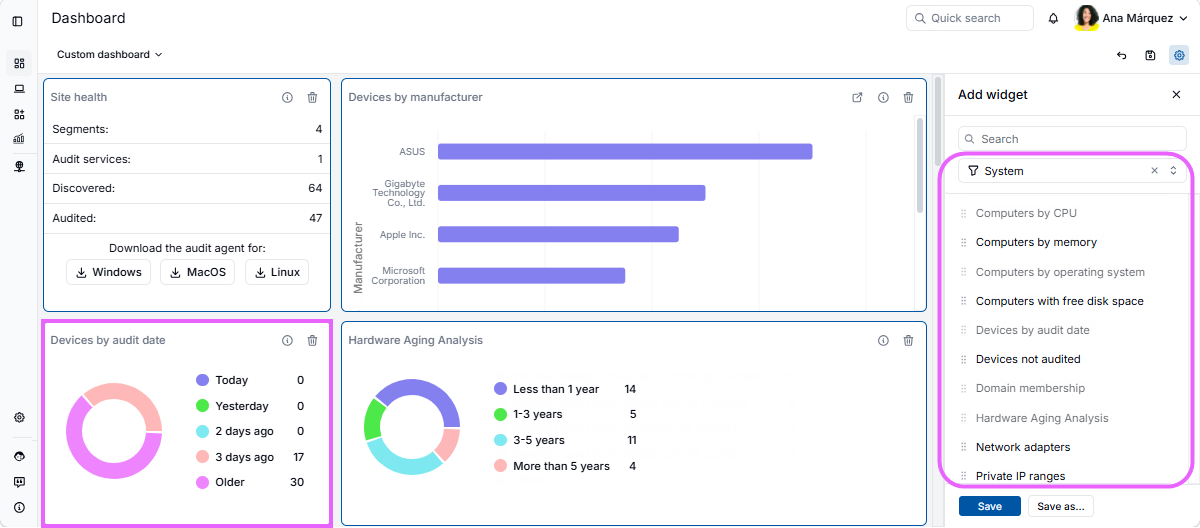
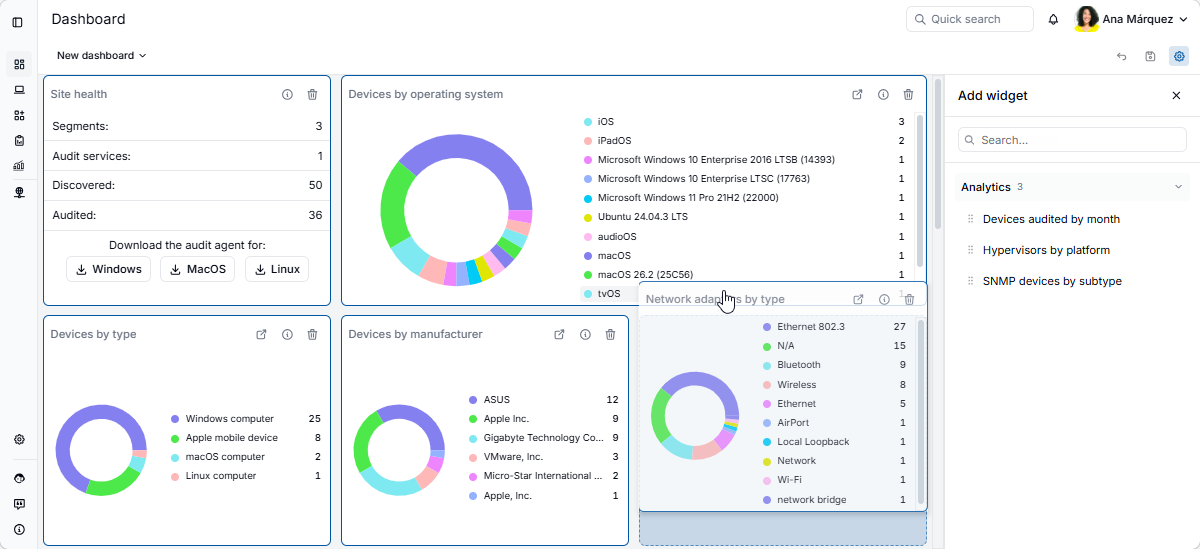
More system widgets with smart data groupingBased on customer feedback, AlloyScan now brings back 17 popular charts from the legacy dashboards as system widgets, alongside Site health. Designed for specific data scenarios, these widgets use smart grouping and presentation logic to keep results clear and useful. Examples include Devices by audit date, Hardware aging analysis, and Recently added software. For easier browsing, the widget panel groups widgets by type, following the familiar Alloy Navigator layout. To add a system widget, select Add widget > System. Unlike Analytics charts, system widgets are predefined views with specialized logic and cannot be fully customized. Some offer settings specific to their purpose.
On this dashboard, the Devices by audit date system widget keeps the chart readable by showing recent audit dates as Today, Yesterday, 2 days ago, and 3 days ago, while combining all earlier dates into Older. The Add widget panel on the right lists all available system widgets. |
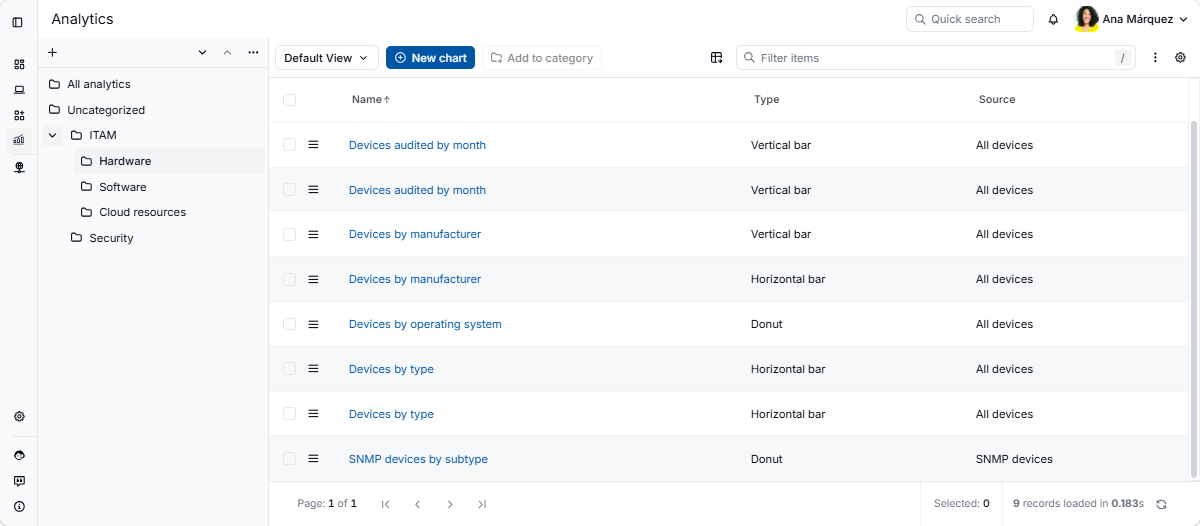
Better organization in AnalyticsYou can now organize analytics into categories and browse them from the new navigation pane. Group analytics into custom categories, arrange categories in a hierarchy, or browse content using All analytics and Uncategorized, just as you can in Alloy Navigator.
|
|
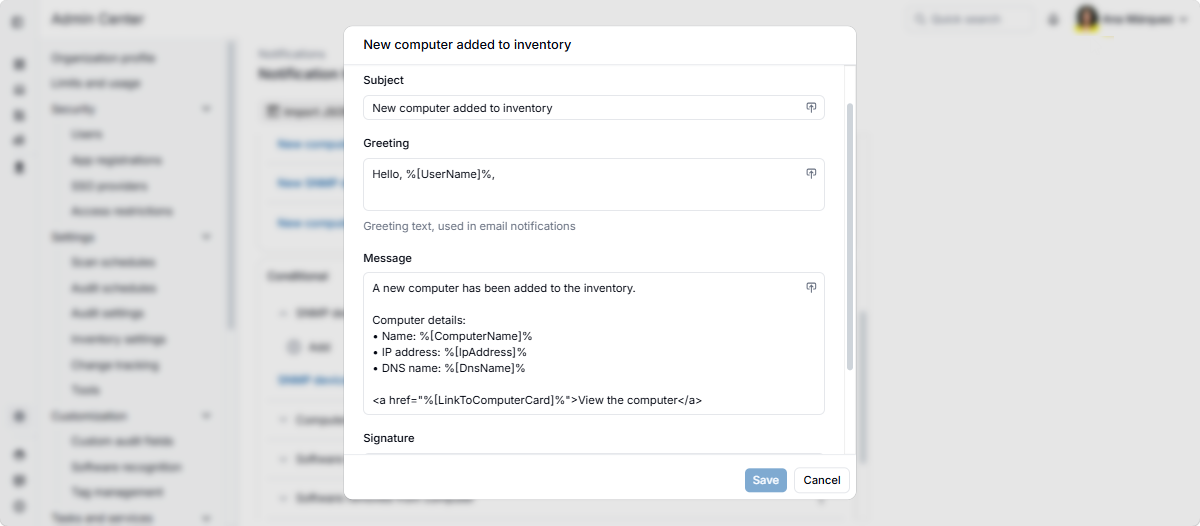
Clearer, more actionable notificationsNotifications and banners now provide more context and direct links to relevant pages in AlloyScan, making it easier to understand what happened and take action. For example, notifications about newly added devices now include key device details and a direct link to the new record. Notification templates are now tailored to each delivery channel and include four separately customizable sections: Subject, Greeting, Message, and Signature. In-app notifications use the subject and message, while email notifications also include the greeting and signature.
|
|
|
|
Resolved intermittent backend service disruptions that could affect portal access and Audit Agent communication or cause 504 Gateway Timeout errors. |
| Additional performance and reliability improvements. | |
| Minor bug fixes. | |
26.7 |
August 4, 2026 |
|
|
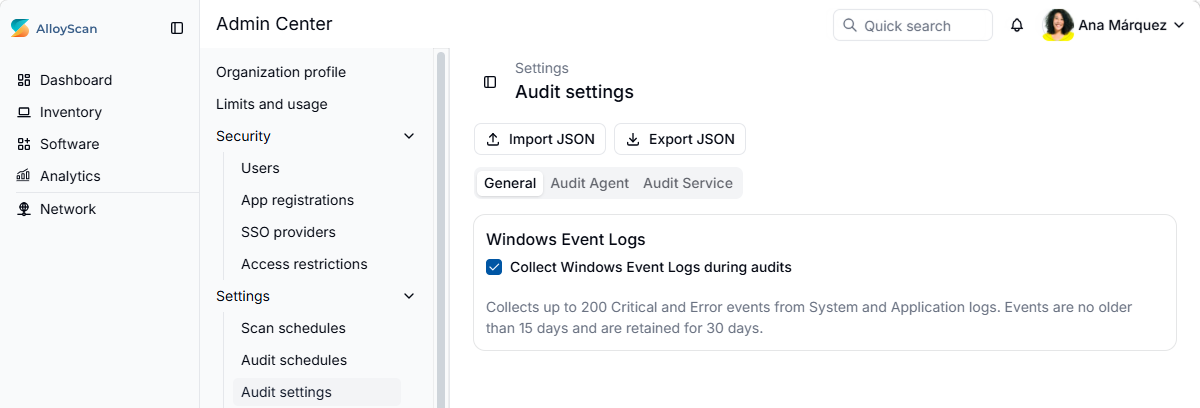
Windows Event Log collectionAlloyScan can now provide centralized visibility into critical Windows issues by collecting recent Critical and Error events from the Windows System and Application logs during audits. Collection is disabled by default and can be enabled in the Admin Center, on the new Audit settings page. To keep data collection focused and manageable, AlloyScan collects up to 200 events per audit, excludes events older than 15 days, and retains the collected data for 30 days.
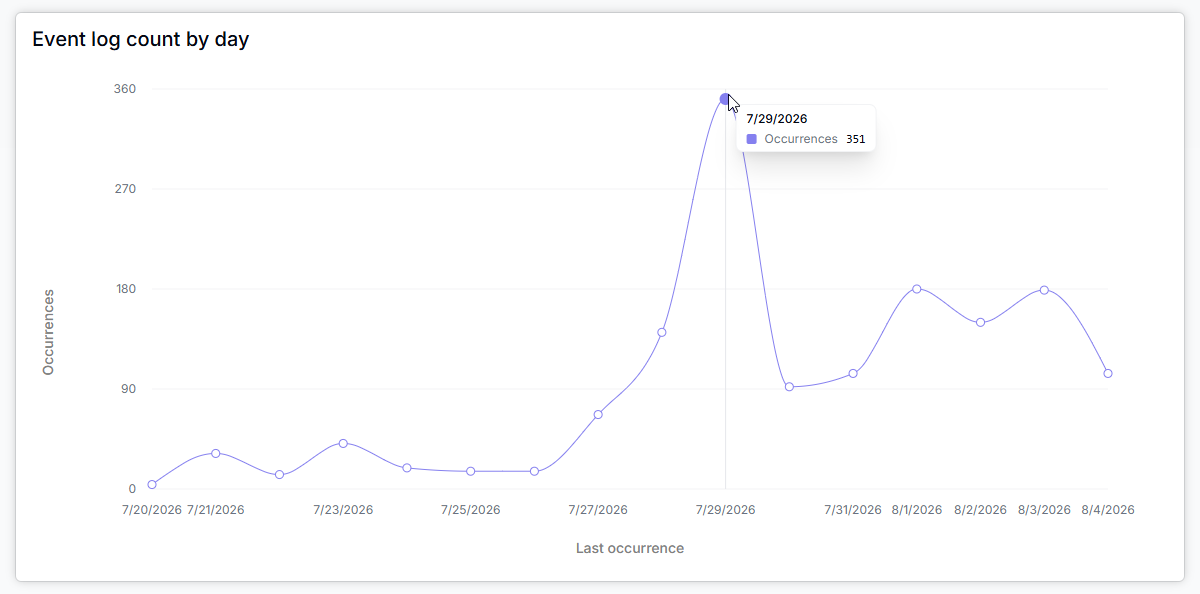
The new Settings > Audit settings page in the Admin Center also includes Audit Agent and Audit Service tabs, replacing the corresponding standalone settings pages. Collected events are available in the Inventory, on computer forms under Details > Software > Event logs. You can also filter computer data views using Event Log data and explore the collected information through several built-in analytics:
|
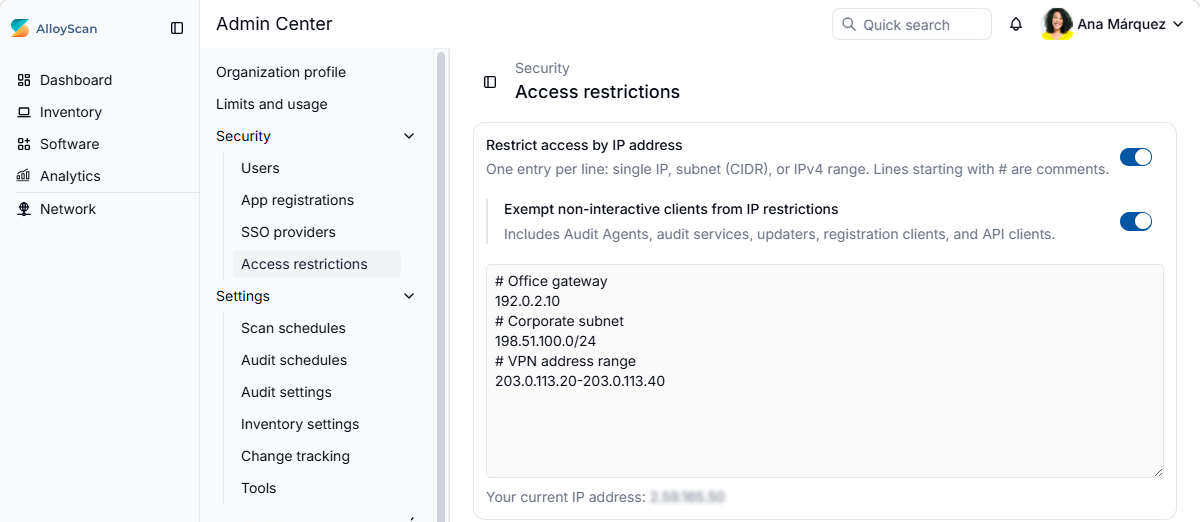
Site-level IP access restrictionsOrganizations can protect their AlloyScan sites by allowing connections only from trusted IP addresses and networks. This provides an additional security layer even if user or API credentials are compromised. IP restrictions are disabled by default and can be configured in the Admin Center, under Security > Access restrictions. The allowlist supports individual IP addresses, CIDR subnets, and IPv4 ranges. Validation helps prevent administrators from accidentally blocking their own access.
By default, IP restrictions do not apply to non-interactive clients, allowing automated communication to continue. Administrators can disable the Exempt non-interactive clients from IP restrictions setting to apply the allowlist to all connections when stricter network control is required. |
|
Universal macOS agent installerThe new universal macOS agent installer supports not only Intel-based Macs, such as MacBook Pro models with Intel processors, but also Apple silicon Macs, such as MacBook Air models powered by Apple M-series chips. A single installer provides the appropriate agent and updater components for each architecture, simplifying deployment across mixed Mac environments. |
|
Optimized network requestsAudit agents and their updaters now receive the information required for routine operations through their standard periodic requests. This reduces unnecessary network traffic while preserving timely audits, updates, configuration changes, and authentication. |
|
|
|
Minor bug fixes, performance enhancements, and usability improvements. |
26.6 |
July 16, 2026 |
|
|
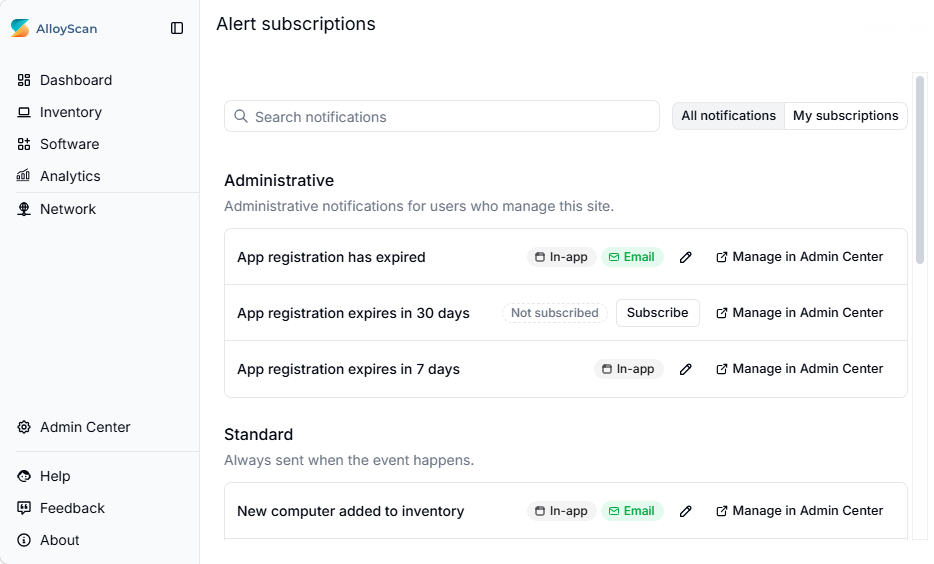
Improved subscription experienceThe notification subscription experience has been redesigned to make it easier to discover, subscribe to, and manage notifications.
|
Dashboard widgets preserve chart typesDashboard widgets now display analytics using their original visualization type instead of converting charts to the compact donut format.
If a chart or table needs more space, simply stretch the dashboard widget horizontally or vertically. |
|
Reports replaced by analytics and data viewsThe legacy Reports functionality has been removed from AlloyScan. Instead, use Analytics and configurable data views. Both support Excel export for reporting and sharing. Many legacy reports are already available as built-in analytics. For reporting needs beyond the built-in content, create your own analytics or data views and use them directly in AlloyScan, or export the results to Excel for sharing with stakeholders. |
|
Automatic recovery of audit agents and updatersAlloyScan can now automatically re-register eligible audit agents and updaters, eliminating the need for manual intervention. Automatic re-registration may reconnect agents on devices that are no longer needed. If this occurs, simply schedule those audit agents for deletion. |
|
Improved security logThe Security log has been enhanced with easier event review, configurable filtered views, and improved performance.
|
|
|
|
Fixed an issue that prevented administrators from creating SSO-only user accounts. When at least one SSO provider is enabled, the new Clear password action lets administrators remove a user's password after confirming that SSO will become the user's only sign-in method. |
|
Other bug fixes and performance enhancements. |
|
26.5 |
June 24, 2026 |
|
|
Interactive analyticsThe new Analytics feature helps you explore inventory data through interactive charts and tables. To help you get started, AlloyScan includes 15 preconfigured analytics covering key inventory areas such as hardware, AWS resources, SNMP devices, hypervisors, logical disks, network adapters, user accounts, antivirus status, BitLocker volumes, and more. Customize the included analytics or create new ones from scratch using any inventory data available in AlloyScan. Choose from multiple chart types, explore data in different views, apply filters, and export analytics in a variety of formats.
|
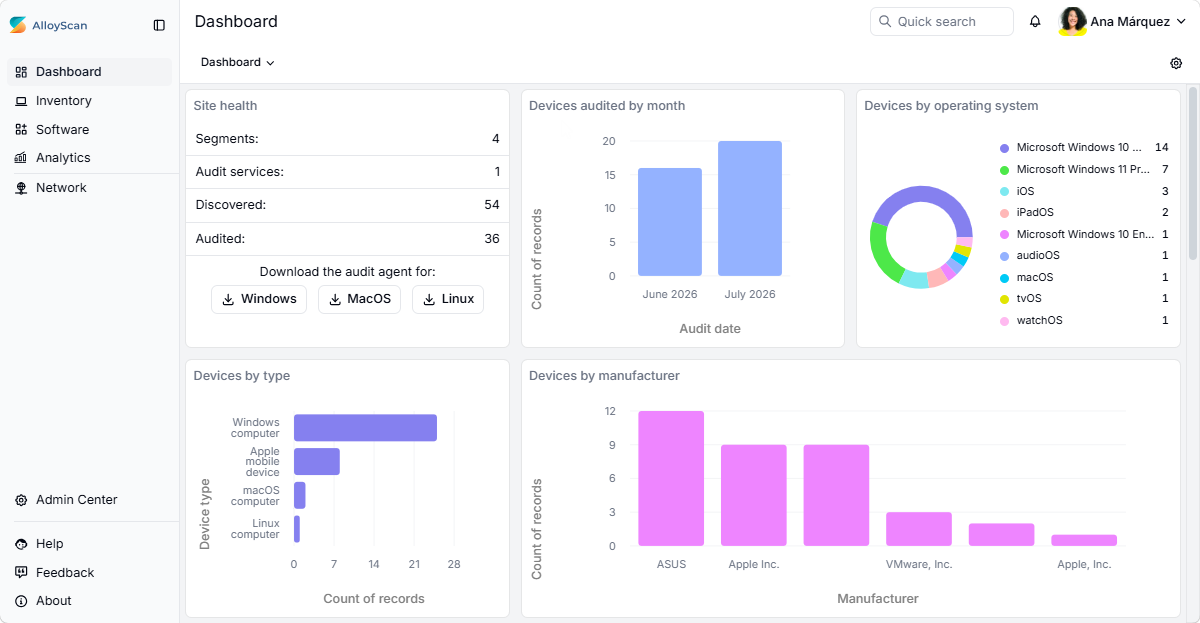
Customizable dashboardsDashboards are now fully customizable and powered by Analytics. Each dashboard widget is backed by an interactive analytic, making it easy to build dashboards tailored to different reporting and monitoring needs. Add and remove widgets, change dashboard layouts, and create multiple dashboards with a designated default one. Keep your most important analytics at your fingertips and bring real-time, customizable inventory insights into your daily workflows.
Dashboard widgets use a compact donut-chart format optimized for at-a-glance monitoring. Open the underlying analytics to explore the data using additional chart types, tables, and views. |
|
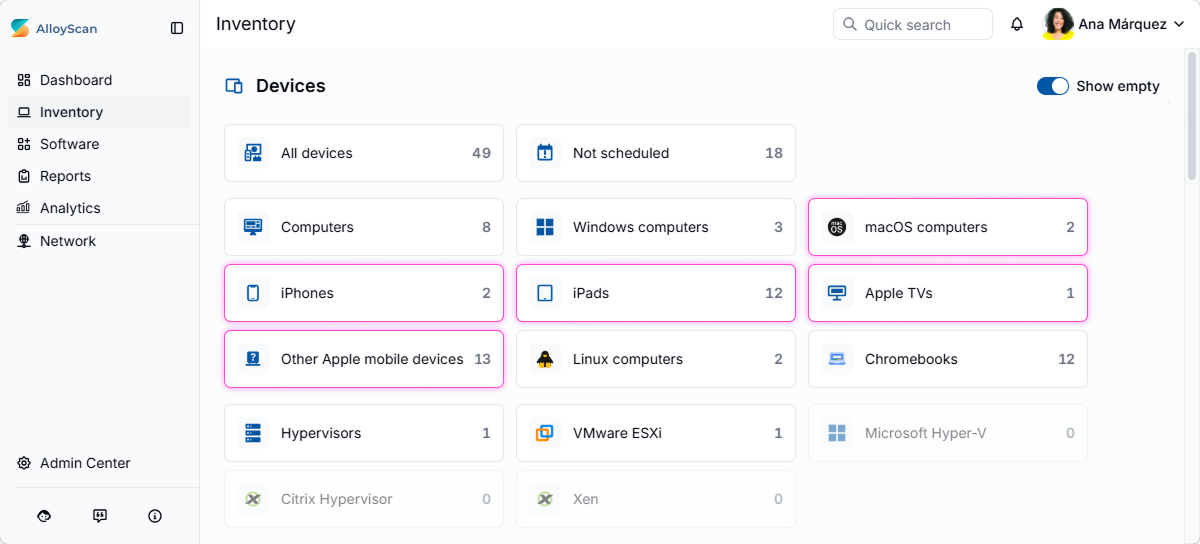
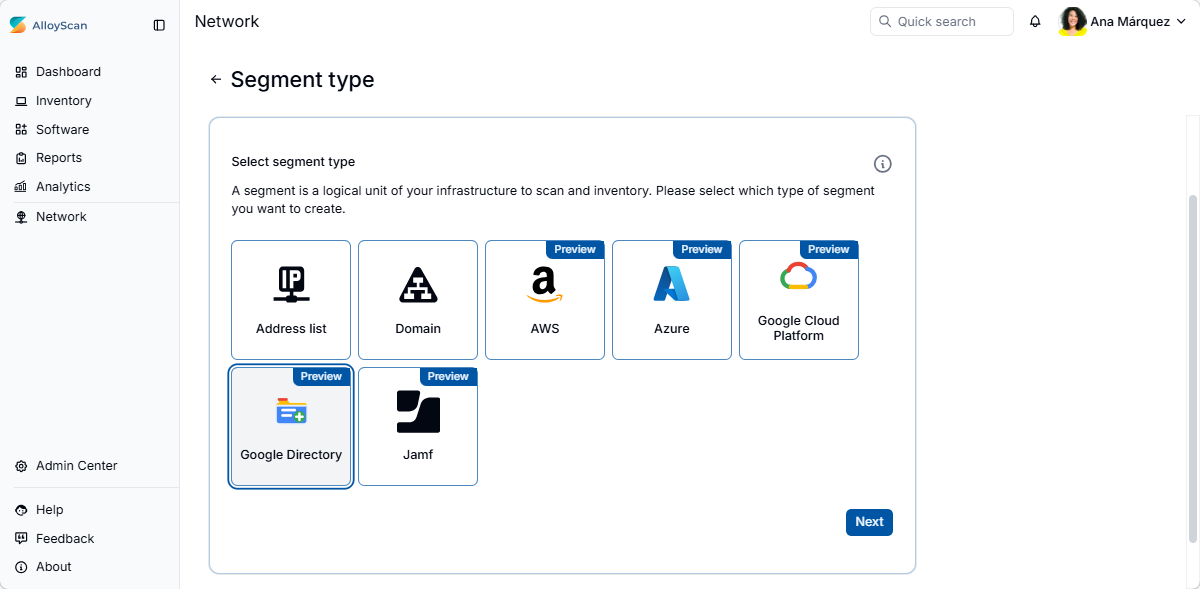
Jamf integration (preview)AlloyScan now supports importing Apple device inventory from Jamf, allowing you to incorporate Jamf-managed devices into your Inventory. Audited devices can then be synchronized with Alloy Navigator and managed alongside other IT assets. To import devices from Jamf, create a Jamf segment, link it to an audit service, and provide the credentials required to access your Jamf environment. The integration imports audited inventory information from Jamf, expanding Inventory coverage to a broader range of Apple devices, including iPhones, iPads, Apple TVs, and more. Jamf data collection follows our standard Scan / Audit model:
While Jamf inventory can include a broad range of Apple devices, only macOS devices can currently be synchronized with Alloy Navigator. This feature is currently in preview. It is fully functional but may continue to evolve. |
|
Chromebook discovery and audit (preview)AlloyScan now supports Chromebooks managed through Google Workspace, allowing them to be tracked alongside the rest of your IT inventory. To discover and audit Chromebooks, create a Google Directory segment, link it to an audit service, and provide the credentials required to access your Google Workspace environment. Google Directory data collection follows our standard Scan / Audit model:
Chromebook synchronization with Alloy Navigator is planned for a future release. Chromebook discovery and audit is currently in preview. It is fully functional but may continue to evolve. |
|
|
|
Security logs now provide improved privacy for multi-site environments by hiding global administrator identities from site administrators. Additional improvements include:
|
|
Other bug fixes, performance enhancements, and usability improvements. |
|
26.4 |
June 1, 2026 |
|
|
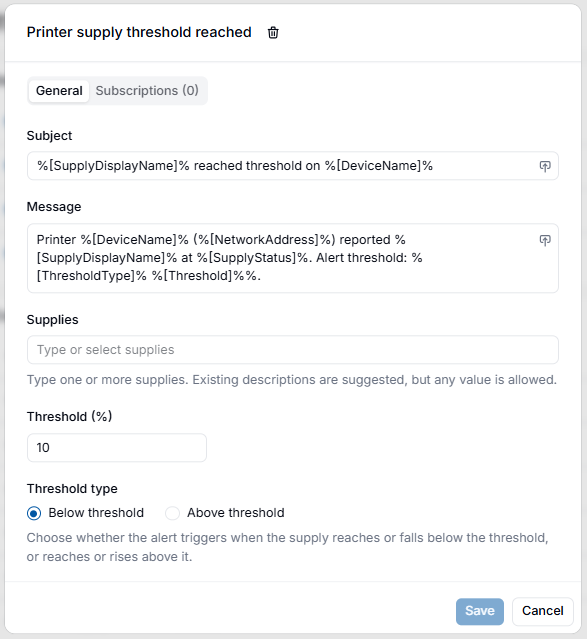
Printer supply alertsMonitor toner, drums, waste toner containers, maintenance kits, and other printer supplies with configurable threshold-based notifications. Get alerted when supply levels reach defined thresholds, helping administrators replace consumables proactively and reduce unexpected printer downtime. You can use the included notification template or create additional rules for specific consumable types and models.
Getting started: In the Admin Center, go to Notifications > Notification templates and manage templates under Printer supply threshold reached. |
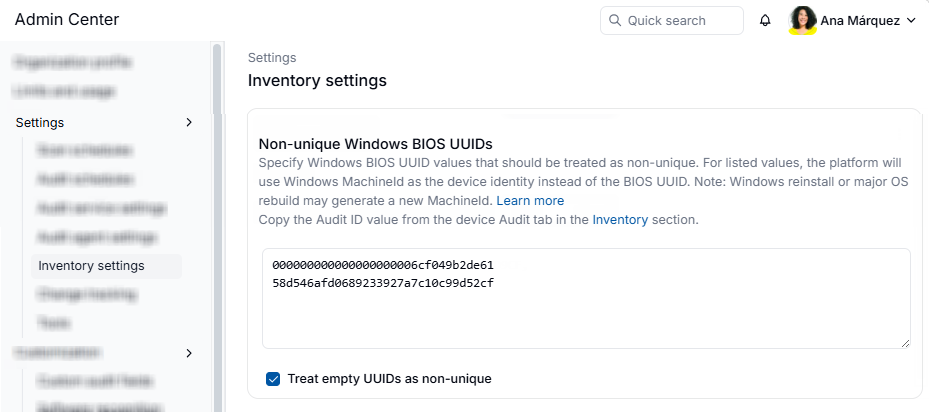
Prevent inventory merging caused by duplicate BIOS UUIDsPrevent inventory records from being incorrectly merged when multiple Windows devices share the same BIOS UUID, a common issue with cloned, imaged, or improperly configured systems. You can specify known non-unique UUIDs (Audit ID) and have AlloyScan use the Windows MachineId (Device ID) instead, helping maintain accurate inventory records and device tracking.
Getting started: In the Admin Center, go to Settings > Inventory settings and configure the Non-unique Windows BIOS UUIDs blocklist. Refer to the documentation for details. Refer to documentation for details. |
|
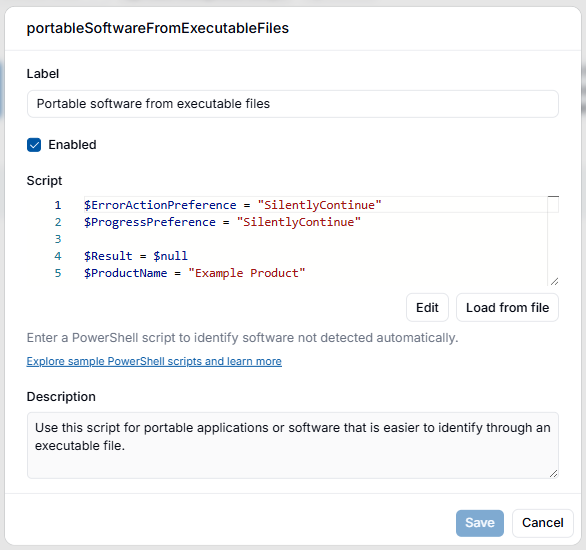
Custom software recognitionIdentify proprietary, portable, and other applications that are not detected by standard software discovery methods. You can create custom recognition scripts to extend software inventory coverage and include additional applications alongside automatically discovered software. Recognition scripts can use information from the Windows Registry, file system, executable metadata, WMI/CIM, and other PowerShell-accessible data sources.
Getting started: In the Admin Center, go to Customization > Software recognition and add a PowerShell recognition script. Refer to documentation for script requirements and examples. |
|
Auto-refresh for data viewsAuto-refresh for tabular data views now updates only changed records instead of reloading the entire dataset. Combined with the enhanced caching layer, this reduces network traffic, improves refresh performance, and keeps data up to date. |
|
|
|
Resolved an issue where unavailable WMI services could cause Windows 11 devices to be identified as Windows 10 during audits. Audits now stop with a clear error when required WMI information is unavailable. |
| Resolved an issue where changing the device type in the Troubleshoot dialog could trigger unexpected errors during recheck operations. | |
|
Multiple internal changes improving platform stability and resiliency. |
|
|
Additional bug fixes and performance improvements. |
|
26.3 |
April 28, 2026 |
|
|
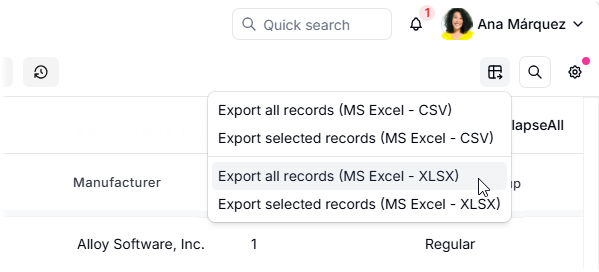
Native Excel exportYou can now export data from tabular data views directly to native Microsoft Excel (XLSX) files, making it easier to work with your data outside AlloyScan. Exported files preserve data types, allowing you to sort, filter, and perform calculations without additional conversion or formatting. Conditional formatting is also preserved.
|
Quick Filter shortcut updated to "/"We replaced Ctrl (⌘) + F to avoid conflicts with browser search. From now on, use "/" (forward slash) to focus the Quick Filter box. This follows a familiar shortcut pattern used in modern web apps and developer tools.
To ensure a unified experience across platforms, we are adding this shortcut to Alloy Navigator data views in the upcoming release. |
|
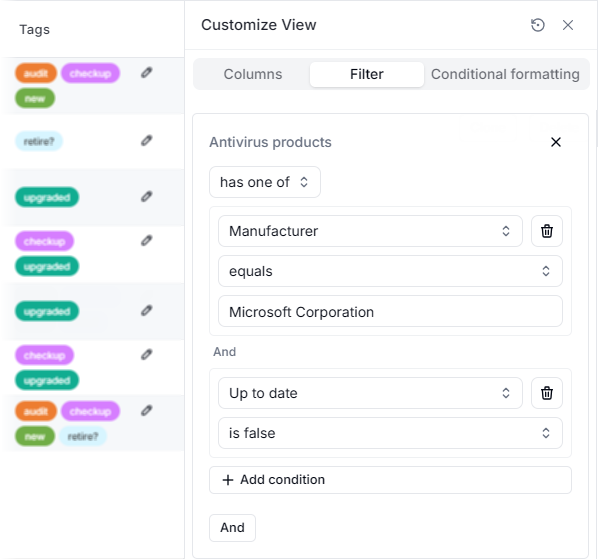
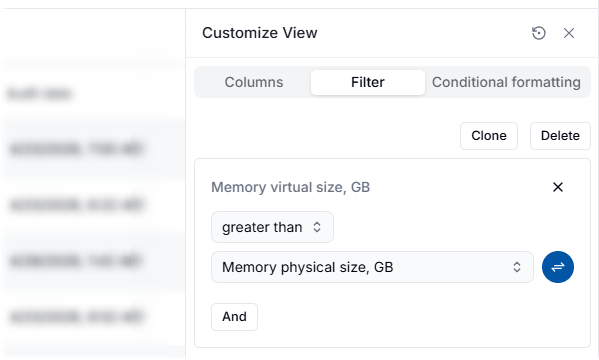
Field-to-field filteringData filtering now supports dynamic field-to-field comparisons. Instead of comparing a field to a fixed value, you can compare it directly to another field of the same type. This helps you quickly identify patterns, mismatches, and deviations without exporting data. Field-to-field filtering is supported in data view filters, on both the Filter and Conditional formatting tabs of the Customize View panel.
|
|
Collection fields in Inventory data viewsYou can now add collection fields as columns in table views. These fields contain multiple related items in a single row — for example, a list of disks, network adapters, or user accounts on a device. Collection fields are marked with a "collection" tag in the Columns tab of the Customize View panel. Supported collection fields:
Values appear as a comma-separated list. If there are too many to show, the rest are hidden behind "+X more". |
|
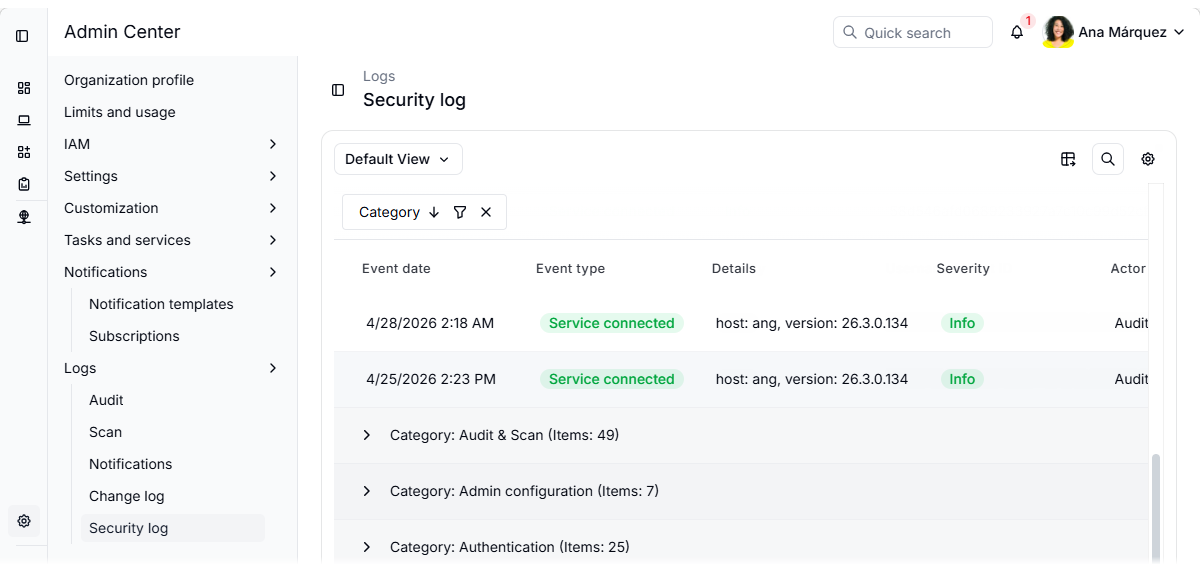
Security log enhancementsThe Security log in the Admin Center (Logs > Security log) now includes expanded event coverage across authentication, authorization, administration, and audit activities, providing better visibility into system activity. New events include:
All events are categorized, allowing you to group them (as shown in the screenshot) or filter by category. Each event also includes a severity level for quick prioritization and relevant details for further context.
Event coverage will continue to expand in upcoming releases. |
|
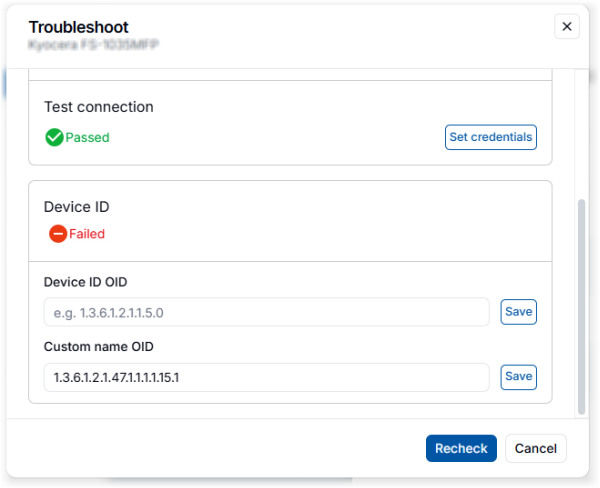
CustomName support for discovered SNMP devicesFor discovered SNMP devices that are not yet ready for audit, you can now assign custom names using a custom OID in the Troubleshooter. This allows you to control device naming when default SNMP values are missing, inconsistent, or not user-friendly. When determining the device name, the system uses the following order:
If a CustomName is configured but returns an empty value, a warning is logged. |
|
|
|
Resolved an issue where AlloyScan failed to retrieve user information on certain devices due to missing Event Log entries causing an exception. Missing Event Log data is now handled without errors and logged as a warning. User and group information collection continues even when login events are missing. |
| Other bug fixes and performance enhancements. | |
26.2 |
April 1, 2026 |
|
|
Advanced data filteringYou can now filter your Inventory data views by collection fields — fields that store a collection of multiple related items within a single record. These fields are marked with a collection tag This allows filtering by multiple properties of each item in the collection, making it easy to find exactly what you need. For example, you can create a data view that would:
Supported collection fields for filtering: Antivirus products, BitLocker volumes, Firewall products, Hypervisors, Installed software, Logical disks, Monitors, Network adapters, Services, Users accounts. |
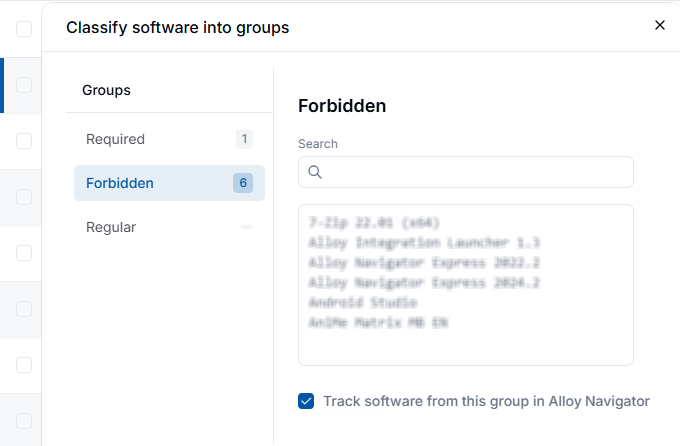
Control which software is imported to Alloy NavigatorWhen classifying software into groups (Required, Forbidden, and everything else remains in Regular), you can now specify whether software from each group should be imported into Alloy Navigator.
For details, see Help: Software grouping. |
|
Clean Audit Agent installEvery Audit Agent install now starts fresh. Any running Audit Agent or Alloy Updater services are stopped, and old files removed. Upgrades are treated as clean installs, preventing conflicts and ensuring a stable, reliable setup. |
|
Collect additional information during cloud auditsYou can now collect additional, resource-specific information during cloud audits in AWS and Azure using custom audit fields, just like for on-premises devices (Google Cloud support coming soon). This lets you capture insights beyond standard audit data, making your inventory more informative.
For instructions, see Help: Custom fields for cloud resources. |
|
Unified view of virtual machine and cloud dataAudit data collected from virtual machines via an audit agent is now automatically linked to the corresponding cloud resources audited by an audit service. When a match is found, you can switch between "external" (cloud) and "internal" (agent-collected) audit data directly from the resource/device card using the View network audit and View cloud audit links. You can also navigate to the corresponding cloud resources from device data views. |
|
|
|
Resolved issues with the installation of the macOS audit agent (AlloyMacAuditAgent) that caused security warnings due to an unsigned executable. The file is now properly signed, improving the installation experience. |
| Resolved an issue where renamed devices could not be audited because AlloyScan was using the old Name values for connection. Rescans now update the Name correctly, allowing audits to complete successfully. | |
Resolved an issue with Linux agentless audits reported by a customer. The problem was caused by an outdated Renci.SshNet.dll library and timeout failures. The fix provided to the customer is now included in this release. |
|
|
Other bug fixes, performance enhancements, and usability improvements. |
|
26.1 |
February 18, 2026 |
|
|
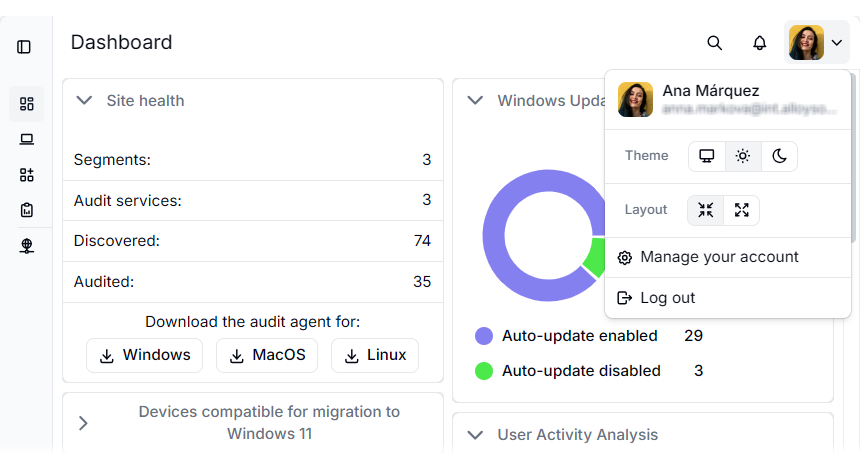
Enhanced, fully responsive interfaceThe UI has been refreshed to provide a more consistent, intuitive, and efficient experience across all devices, whether you’re on a large desktop monitor, a laptop, a tablet, or even a phone. Layouts, forms, dashboards, and navigation elements now automatically adjust to different screen widths and resolutions, ensuring a smooth, consistent experience everywhere. We’ve also added two layout modes, so you can choose the view that best fits your screen and workflow:
These improvements make the app more intuitive, efficient, and reliable, giving you a better experience on all devices and screen sizes.
|
|
Watch this short video for an overview of this and other features of AlloyScan 26.1:
|
|
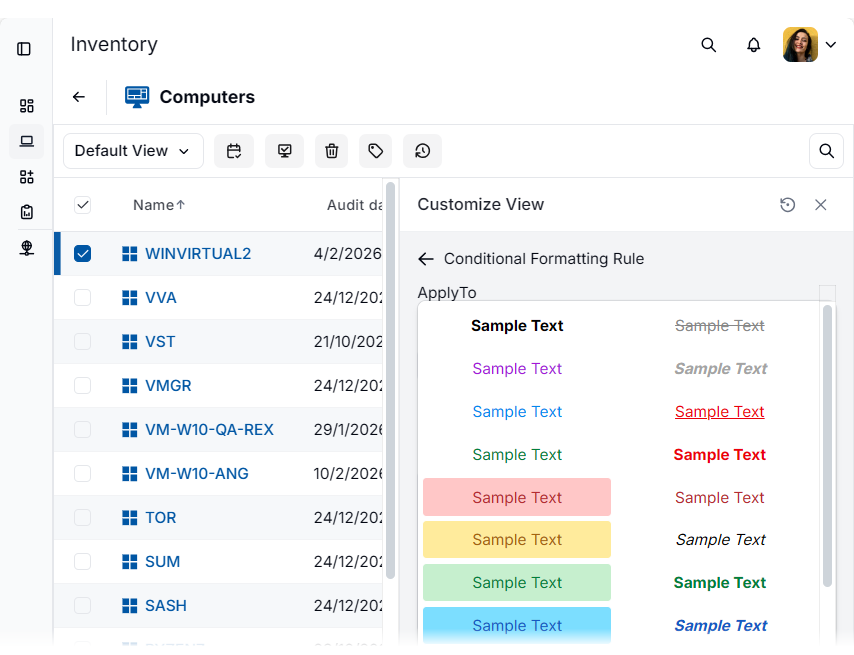
Conditional formatting in data viewsTabular data views now support conditional formatting, just like in Alloy Navigator, allowing users to highlight rows or individual cells based on specific conditions. This makes important data easier to spot and interpret immediately, improving visibility and decision-making.
|
|
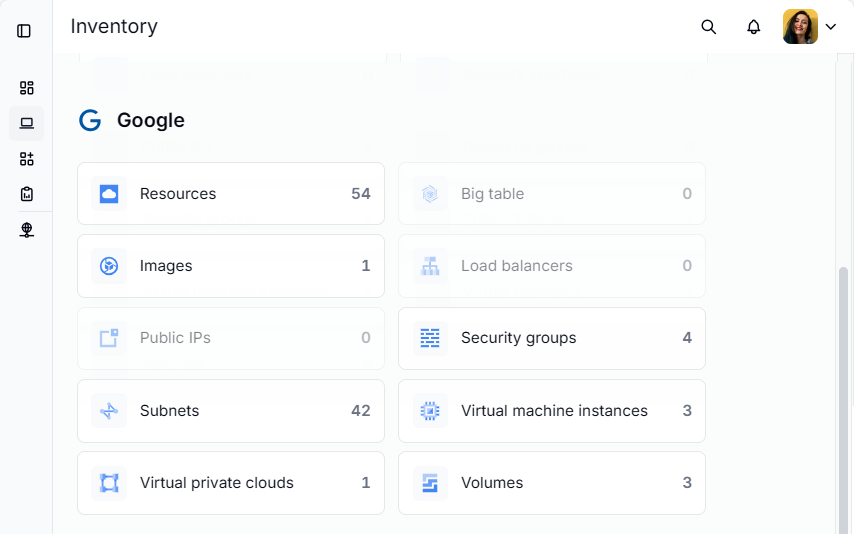
Google Cloud Platform discovery & auditPreview Google Cloud Platform (GCP) is now available as an audit source alongside AWS and Azure. Organizations using GCP can now discover and audit their cloud resources directly in AlloyScan. GCP resources appear in the Inventory alongside other assets, providing a unified view across all resources and devices. To audit Google Cloud resources, create a segment of the appropriate type, link it to an audit service, and provide the credentials required for accessing your cloud environment. For details, see Help: Creating Google segments. Cloud data collection follows our standard Scan / Audit model:
This feature is currently in preview. It is fully functional but may continue to evolve. |
|
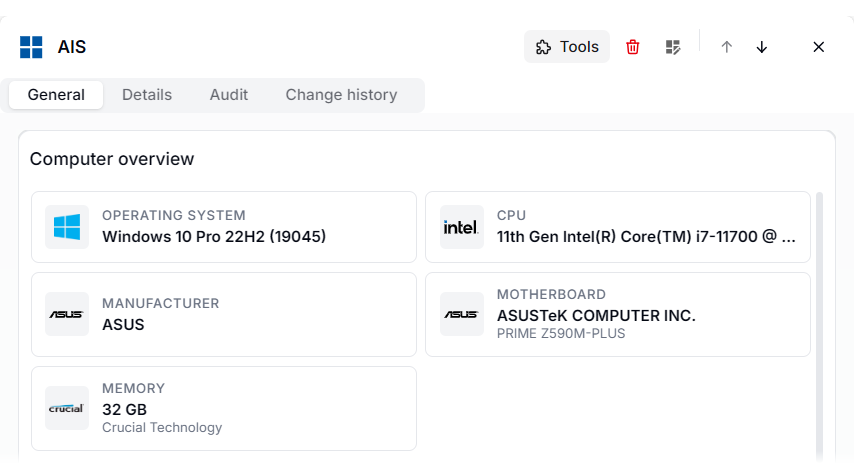
Expanded list of manufacturersAlloyScan now includes broader manufacturer recognition, with 70+ new vendors added to the system. Familiar brand icons and related details appear on device cards and in other views, helping you quickly identify manufacturers at a glance, even before reading the name.
|
|
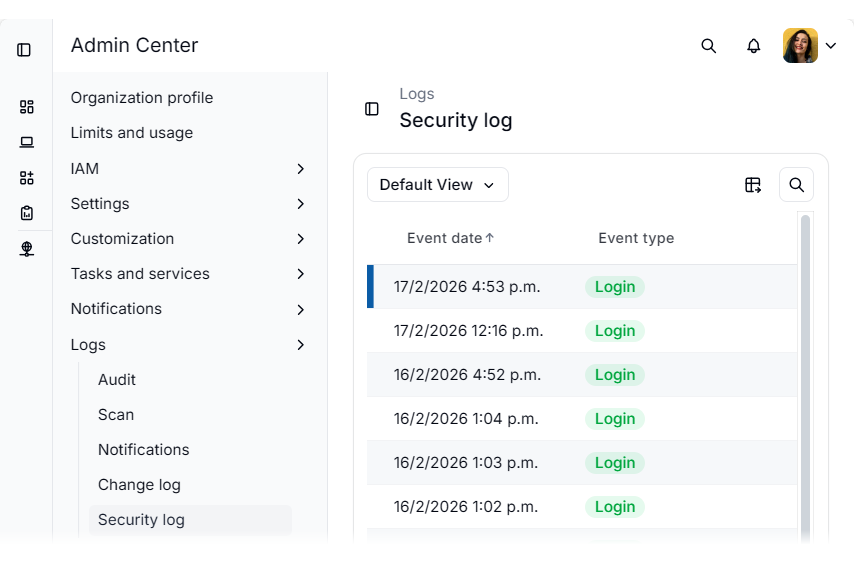
Security logA new log is now available in the Admin Center, under Logs | Security log. It captures user and API logins, session timing, and IP information in a structured view, helping administrators easily review and investigate security activity.
|
|
Updated Alloy Software logoAudit service and agent installers now use the new Alloy Software logo, replacing the old one and providing a consistent and recognizable brand experience.
|
|
|
|
Several bug fixes, performance enhancements, and usability improvements. |
 NEW
NEW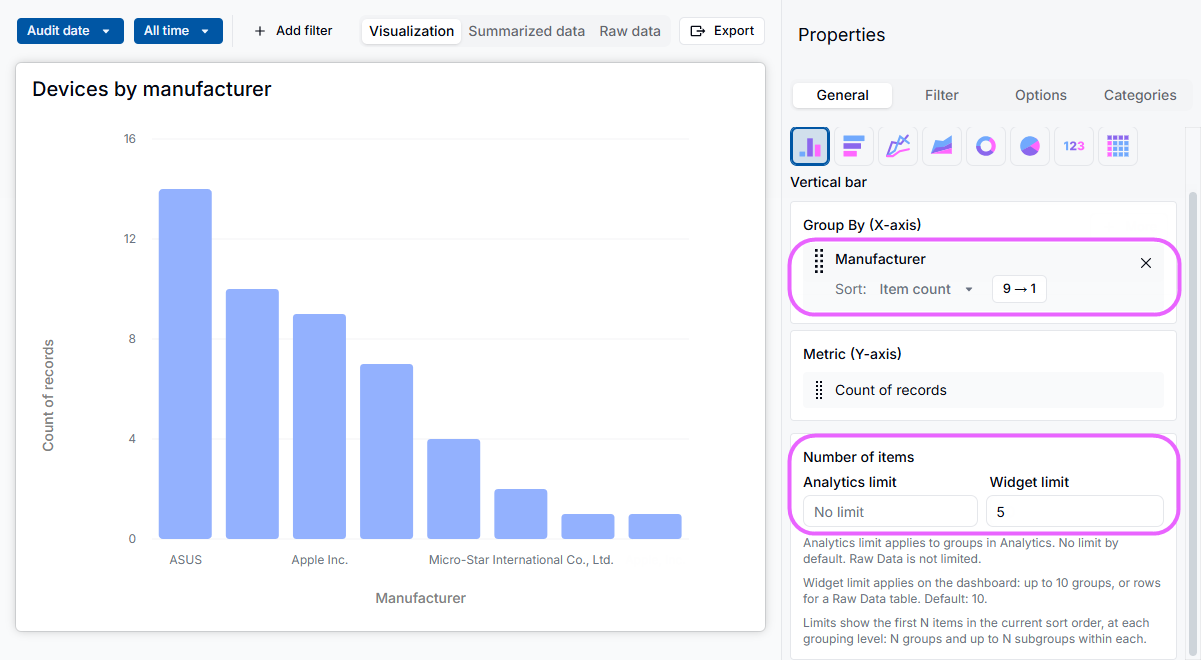
 FIXED
FIXED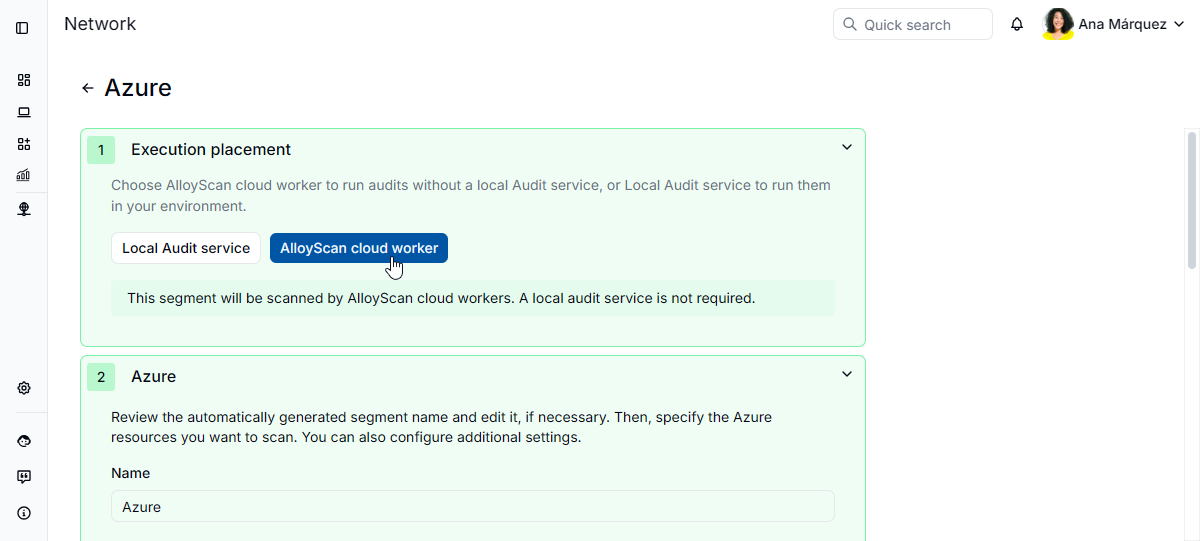

 in the