Track your tickets and requests
In the Tickets and Requests section, you can see all your tickets
Open Tickets and Requests
To open the Tickets and Requests section, select Tickets and Requests from the main menu.
At the top of the page, you’ll see four tabs that organize your activity:
-
Tickets: Issues you’ve reported to IT
-
Service Requests: Requests for services such as password resets or new equipment
-
Equipment Reservations: Items you’ve reserved, such as laptops or projectors
-
Approval Requests: Requests awaiting your approval
Each tab shows a list of your tickets
Click the ID to open the full item, where you can see its history, attachments, and any comments from the IT team.
Update your
Filter and search
Use the tools at the top of the page to quickly find what you need:
-
Switch between predefined views, like All Tickets, Open Tickets, All Tickets (Collaborator), to quickly see the tickets you’re interested in.
-
Sort tickets by any column using the arrow in the column header.
-
Use the filter box to search by keywords
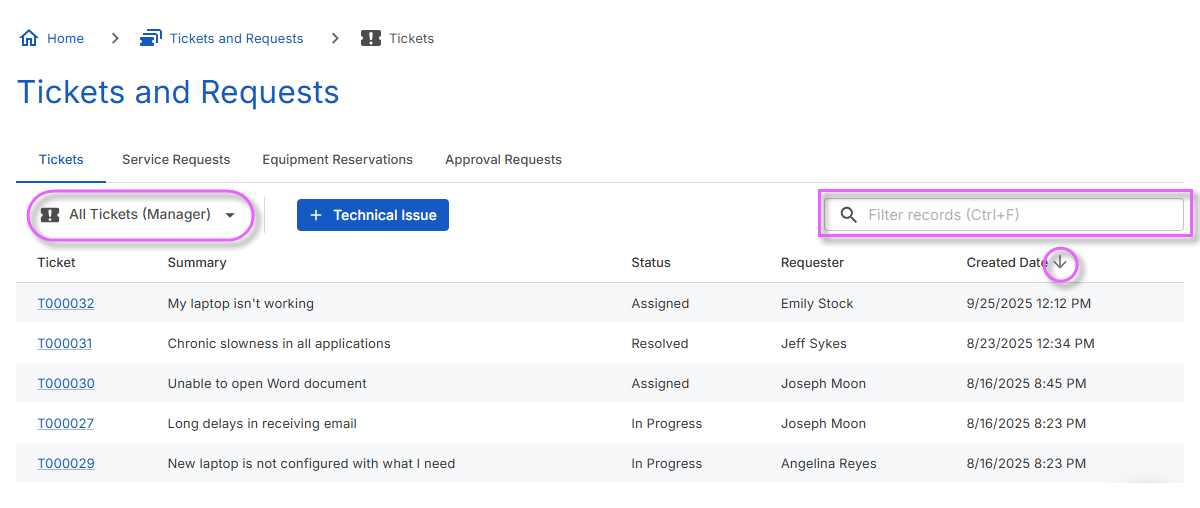
Manager's view
If you’re a manager, you may see additional views showing tickets
-
Track ongoing work and make sure requests are handled on time
-
Add comments to your teammates' tickets and mark them as closed
-
Add or remove collaborators
Collaboration
If you’ve been added as a collaborator on someone else's ticket
Being a collaborator allows you to
-
Stay informed about issues that also affect you or your team
-
Receive notifications on progress and follow the resolution even if you’re not the original requester
-
Update the ticket with comments and even mark it as closed
-
Add or remove other collaborators