AI Assistant
Introduced in 2025.2
Updated in 2026
Your Self-Service Portal may include an AI Assistant set up by your IT organization.
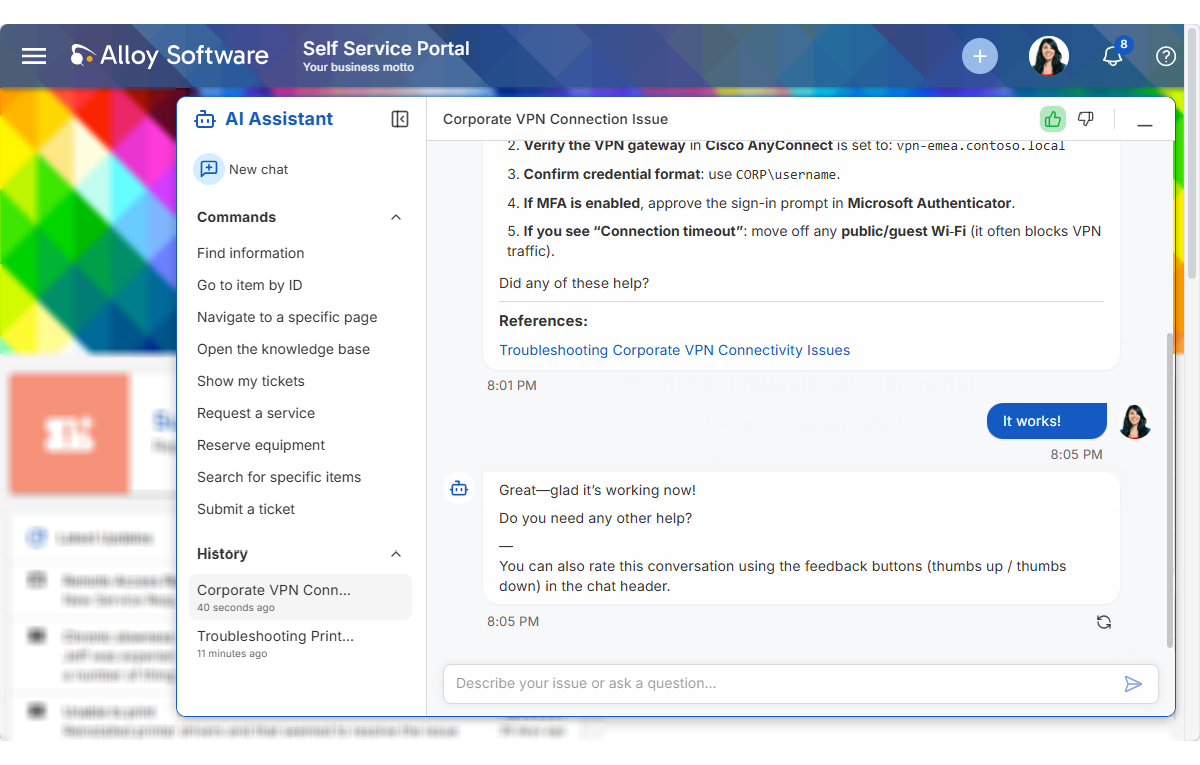
The assistant is there to help you get things done faster. Depending on how your portal is configured, you can use it to ask for help with technical issues, check on existing tickets, report new problems
Use the assistant
When the AI Assistant is available, you can find it in the lower-right corner of the portal.
Open the assistant and type your question or describe what you need. You can write naturally, just as you would explain the issue to a support specialist. The assistant can understand requests in different languages.
For common actions, you may also see quick options in the assistant window. These options help you start frequent tasks faster, such as submitting a ticket or reserving equipment.
Manage conversations
You can have more than one conversation with the assistant. This is useful when you want to keep different questions or requests separate and return to them later.
Share feedback
After you finish a conversation, you may be able to rate the assistant’s response and leave feedback.
Your conversations and feedback may be saved and shared with your IT organization to help with support, troubleshooting, and service improvement.