What's new in version 2025.3.1
February 2026
Version 2025.3.1 is a planned maintenance release.
Attachments
-
Resolved an issue that prevented workflow
-
Fixed an issue where workflow action forms with a required Attachment field could not be submitted after initially failing validation. Adding the required attachment did not re-enable submission. The form now submits correctly once the attachment is provided.
Dashboards
-
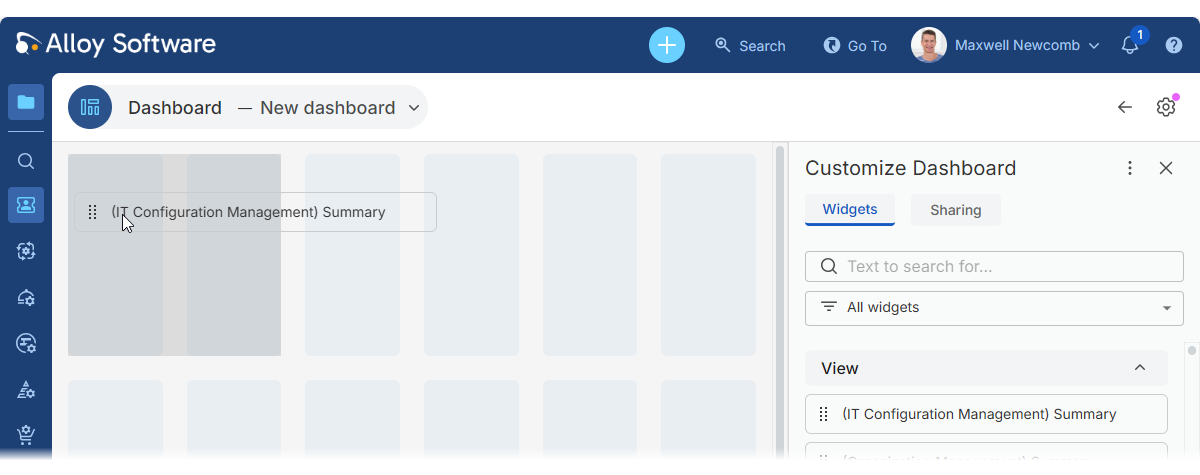
Enhanced the dashboard creation experience when starting from scratch. Improvements and fixes include:
-
The layout grid is now displayed immediately, even before the first widget is added, making it easier to organize widgets from the beginning.
-
Resolved visual issues that could occur when adding the topmost widget from the Customize Dashboard panel to an empty dashboard.
-
New dashboards are saved as personal by default instead of shared.
-
Newly created dashboards use "New dashboard" as the default title to prevent confusion with existing dashboards.
-
-
Fixed an issue where a widget could not be re-added to a dashboard immediately after being removed. Previously, a different widget had to be added first before the removed widget became available again. Removed widgets now appear immediately in the Customize Dashboard panel and can be re-added right away.
-
Added a prompt when leaving a modified dashboard to help prevent accidental loss of unsaved changes
-
Fixed an issue where dragging a widget could unintentionally select its title text. Widgets can now be dragged and dropped smoothly without selecting text.
-
For administrators: Resolved an access violation error in the desktop Settings App that could occur when adding fields to a Chart-type widget.
Languages & regions
-
Fixed issues that occurred when Bulgarian was set as the browser language. Previously, certain errors could arise due to a literal value in the date format. These issues have been resolved, and Alloy Navigator now works correctly with Bulgarian and other locale settings.
@Mentions
-
Improved performance of the @mentions feature. Typing @ to activate mentions no longer causes the UI to freeze, even with large numbers of users available for selection.
Merging IT assets
-
Fixed an issue with merging Computers or Hardware. When using the Overwrite all values in the target record option, the target record now correctly inherits the associated Asset and financial values from the source record. Previously, the Asset had to be reassigned manually after the merge.
HTML editor
-
Fixed an HTML parsing error (SetTaskData: HTML parse error: Access Violation in module ‘ANWP.dll’) that could occur when inserting certain HTML content, typically containing
<span>elements, into rich-text fields.
Self-Service Portal
-
Resolved an issue with direct-link access in the Self-Service Portal for users who were not signed in, such as when opening tickets from email notifications. Previously, opening a direct link could trigger a "You do not have enough permissions" error even for users with access. After signing in, users were redirected to the homepage and had to reopen the link manually.
The portal now prompts users to sign in first and then takes them directly to the target ticket or displays a permission error if access is denied.
-
Improved performance for large Service Catalogs. The Self-Service Portal now loads and displays catalogs containing thousands of items much faster, providing a smoother and more responsive experience.
-
Improved Self Service Portal performance with large datasets. Previously, retrieving data in very large environments with hundreds of thousands of interrelated tickets could noticeably slow the portal. Recent optimizations make the Self-Service Portal faster and more responsive, even in demanding scenarios.
Logging
-
For administrators: Enhanced error logging for AI-Powered Insights Index Maintenance jobs. The Scheduled Task log now clearly shows the AI provider’s error codes and messages, helping administrators quickly diagnose and resolve configuration issues.